9 min read
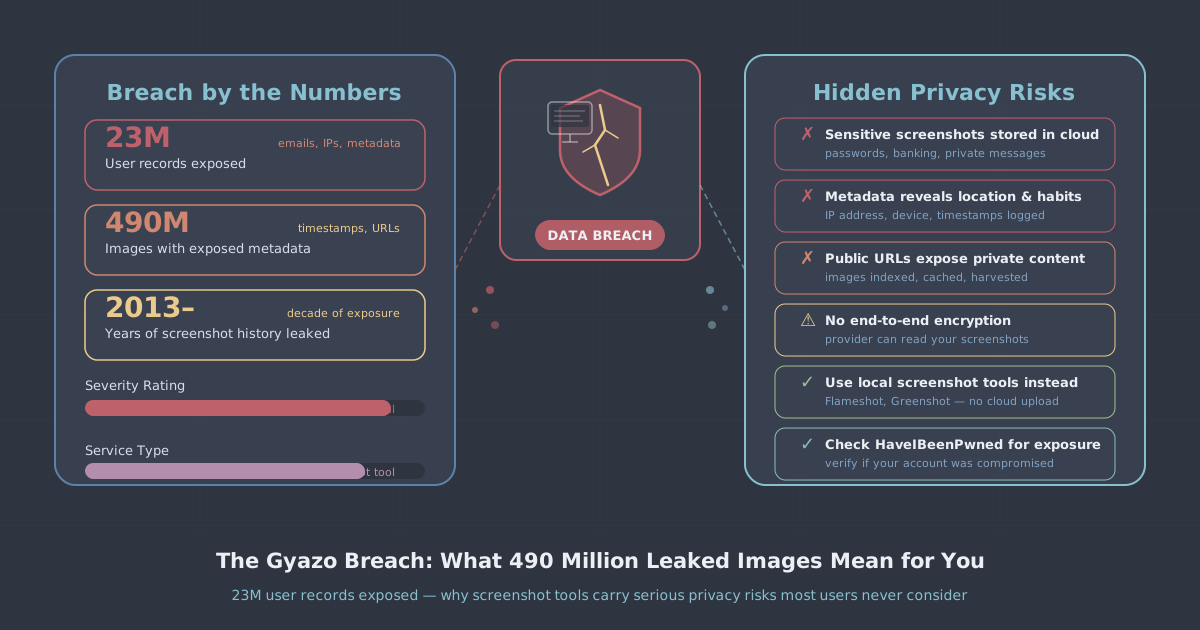
On 11 September 2026, an attacker exploited a vulnerability in Gyazo's image upload server and executed arbitrary commands on its backend systems. Within hours, roughly 23.62 million user records were stolen—names, email addresses, hashed passwords, session IDs, OAuth tokens, and more. The attacker also walked away with metadata for approximately 490 million images uploaded before 2019, metadata that could be used to reconstruct private image URLs. Helpfeel, the Japanese company that operates Gyazo, has said it cannot rule out that some of those private images were actually viewed.
That is a remarkable sentence to have to write in a public disclosure. But it reflects something most people who use screenshot tools never stop to consider: every image you capture and upload to a cloud sharing service is sitting on someone else's server, indexed, queryable, and dependent on that company's security for its continued privacy.
This article looks at what the Gyazo breach actually exposed, why screenshot tools represent a category of privacy risk that tends to get underestimated, and what practical steps you can take to reduce your exposure going forward.
What Gyazo collected—and what was taken
Gyazo is a cloud-based screenshot and screen-recording tool with around 23 million users worldwide who have collectively uploaded more than 3.1 billion images. The service is free to use, and it works by capturing your screen, uploading the image immediately to Gyazo's servers, and handing you a shareable URL. That convenience is the product. The images live on Gyazo's infrastructure indefinitely unless you delete them manually.
The breach, detected on 12 September 2026, exposed the following categories of data:
- Personal identifiers: names and email addresses for approximately 23.62 million accounts
- Authentication data: hashed passwords, device IDs, and session IDs
- Third-party integration tokens: X (Twitter) OAuth tokens and Google SSO email addresses used for single sign-on
- Billing and usage data: subscription status and usage statistics
- Image metadata: IDs for approximately 490 million images uploaded before 2019, which could be used to reconstruct URLs for images marked as private
Helpfeel patched the vulnerability on 12 September, reported the incident to Japan's Personal Information Protection Commission on 15 September, and made a public disclosure on 16 September 2026. That timeline is relatively responsible by breach disclosure standards. But the damage was already done.
Why image metadata is more dangerous than it sounds
When people think about a data breach, they tend to focus on the obvious credentials: email addresses, passwords, payment details. The 490 million image metadata entries in this breach deserve equal attention.
Gyazo generates a unique ID for each image and constructs a URL from it. Images marked private are not indexed or linked publicly, but they are still accessible via their direct URL if you know it. If an attacker can reconstruct those URLs from the stolen IDs—and Helpfeel's disclosure suggests this is possible—then the images themselves become accessible, not just the metadata.
Think about what people routinely screenshot and upload to tools like this:
- Browser tabs showing account dashboards, order confirmations, or banking interfaces
- Conversations containing personal information or internal business details
- Error messages that include file paths, system information, or API keys
- Documents shared in messaging apps, sometimes containing signatures or identity data
- Code snippets with credentials or configuration details left in comments
None of that content feels sensitive when you are quickly grabbing a screenshot to share with a colleague. But it accumulates over years, and it sits in a cloud database with a reconstructable URL. Helpfeel's admission that it cannot rule out private images having been viewed is not a legal hedge—it is an accurate description of the exposure.
Session tokens and OAuth: the overlooked credential theft
The stolen session IDs and X (Twitter) OAuth tokens deserve separate attention. These are not passwords. They are the tokens your browser or app uses to stay logged in after authentication. If a session token is valid and an attacker presents it to the right service, they may be able to access your account without knowing your password at all—and without triggering a failed login alert.
OAuth tokens for third-party integrations are similarly powerful. A valid Twitter OAuth token can allow an attacker to read your direct messages, see your connected accounts, or post on your behalf, depending on what permissions you granted when you linked your account to Gyazo.
Helpfeel has said the session IDs stolen were from before a certain date, which limits their likely validity—most services expire sessions after a period of inactivity. But if you used Gyazo with an X or Google account integration, it is worth reviewing the connected applications in your account settings for both platforms and revoking any Gyazo-related access.
The broader problem with cloud screenshot tools
Gyazo is not unusual in how it operates. A large category of productivity tools—screenshot sharers, clipboard sync apps, annotation tools, screen recorders—work by uploading your content to a cloud backend and generating a URL. The convenience is real. The privacy implications are structural.
When you upload an image to one of these services, several things happen that are easy to overlook:
- The image is stored on the provider's servers, sometimes indefinitely
- It is assigned metadata that persists in databases separate from the image file itself
- It may be indexed or processed for features like search or tagging
- It exists within a security perimeter you have no visibility into and no control over
The Gyazo breach is a reminder that even images you think of as temporary or private are only as safe as the platform holding them. A breach does not require the attacker to download 490 million image files—stealing the metadata that points to them can be enough.
What you should do now if you use Gyazo
If you have a Gyazo account, the following steps are worth taking immediately:
- Change your password on Gyazo and on any other service where you used the same password. The stolen passwords were hashed, but hashing is not a guarantee of safety—weak or common passwords are crackable.
- Revoke Gyazo's access in your X (Twitter) and Google account settings under connected apps or third-party applications.
- Review your uploaded images. Log in to your Gyazo account and audit what is there. Delete anything that contains sensitive content—documents, credentials, personal information, internal business material.
- Enable two-factor authentication on your email account, your Google account, and your X account if you have not already done so.
- Monitor for phishing. Your email address is now confirmed and associated with a recognisable service. Expect targeted phishing attempts referencing the breach.
Reducing your exposure to this category of risk
The most direct way to avoid this class of problem is to be deliberate about which tools get to store your content in the cloud. That does not mean avoiding all cloud services—but it does mean thinking about what each tool actually does with the content you give it.
For screenshots specifically, consider whether you need cloud upload at all. macOS and Windows both have capable built-in screenshot tools that save files locally. If you need to share an image, you can upload it yourself to a channel or service you already trust, rather than routing it through a dedicated screenshot platform that keeps a permanent copy.
If you use a VPN, it is worth understanding what it does and does not protect in a scenario like this. A VPN encrypts your traffic between your device and the VPN server, which is useful for preventing network-level interception—but it does not protect data you actively upload to a third-party service. Once an image is on Gyazo's servers, your VPN's encryption is irrelevant to whether that image is safe. What a VPN does protect is your IP address and browsing activity from being observed on the network, which is a separate and real benefit. You can read more about what a VPN actually does and does not do in our plain-language explainer.
The risk that the Gyazo breach illustrates is upstream of the network—it is about what you choose to hand to a third party and leave there. Good habits around that choice matter independently of what security tools you use.
A note on third-party integrations
The presence of X OAuth tokens and Google SSO credentials in this breach is a reminder that connecting accounts to third-party services creates additional attack surface. Every integration you authorise is another path that could expose your primary account if the third party is compromised.
It is good practice to audit your connected applications periodically. Both Google and X provide lists of every app that has been granted access to your account. If you see something you no longer use, revoke it. The permissions Gyazo requested when you signed up may have included access to your profile, your email address, or in some cases your posts—access that persists until you explicitly remove it.
Summary
The Gyazo breach is one of the larger platform disclosures of 2026, and the 490 million image metadata entries make it unusual even among large breaches. Most credential leaks expose what you typed into a form. This one exposed what you chose to show on your screen—content that is often more sensitive than a password because it reflects what you were actually doing.
The practical takeaways are straightforward: change reused passwords, revoke third-party integrations you no longer need, delete sensitive images from cloud screenshot tools, and be deliberate going forward about which services get to store your content. Screenshot tools are not inherently dangerous, but treating them as ephemeral when they are actually persistent is a habit worth breaking.
If you want to understand more about how to reduce your overall network privacy exposure, our no-logs policy explains how PremierVPN handles data, and our IP leak test is a quick way to verify your VPN connection is working as expected.