8 min read
Most people who use a VPN are familiar with the basics: your traffic is encrypted, your IP address is masked, and your DNS queries are sent through the VPN's own resolver rather than your ISP's. What far fewer people know is that this doesn't have to be all-or-nothing. Split DNS lets you decide which DNS queries go through the VPN and which go through your regular network—and done correctly, it solves a real problem without compromising your privacy.
This post explains what split DNS is, why it exists, how it relates to (but is not the same as) split tunnelling, and the situations where enabling it will genuinely improve your setup. If you've ever wondered why certain internal domains stopped resolving the moment you connected to a VPN, you've already encountered the problem split DNS is designed to fix.
A Quick Primer on How VPNs Handle DNS
When you type a domain name into your browser, your device sends a DNS query to translate that name into an IP address. Without a VPN, that query typically goes to your ISP's resolver—or to a third-party resolver you've configured manually. Either way, whoever handles the query can see every domain you look up.
When you connect to a VPN, the client intercepts those DNS queries and sends them through the encrypted tunnel to the VPN provider's own resolver. This prevents your ISP from logging your browsing activity at the DNS level. It's a meaningful privacy improvement, and it's why DNS leak protection matters—if queries escape the tunnel and reach your ISP anyway, you lose a significant portion of the privacy the VPN is supposed to provide.
This works well for general internet browsing. The complication arises when you're on a network—typically a corporate or home network—that has its own internal DNS server managing private domain names that only make sense locally.
What Split DNS Actually Means
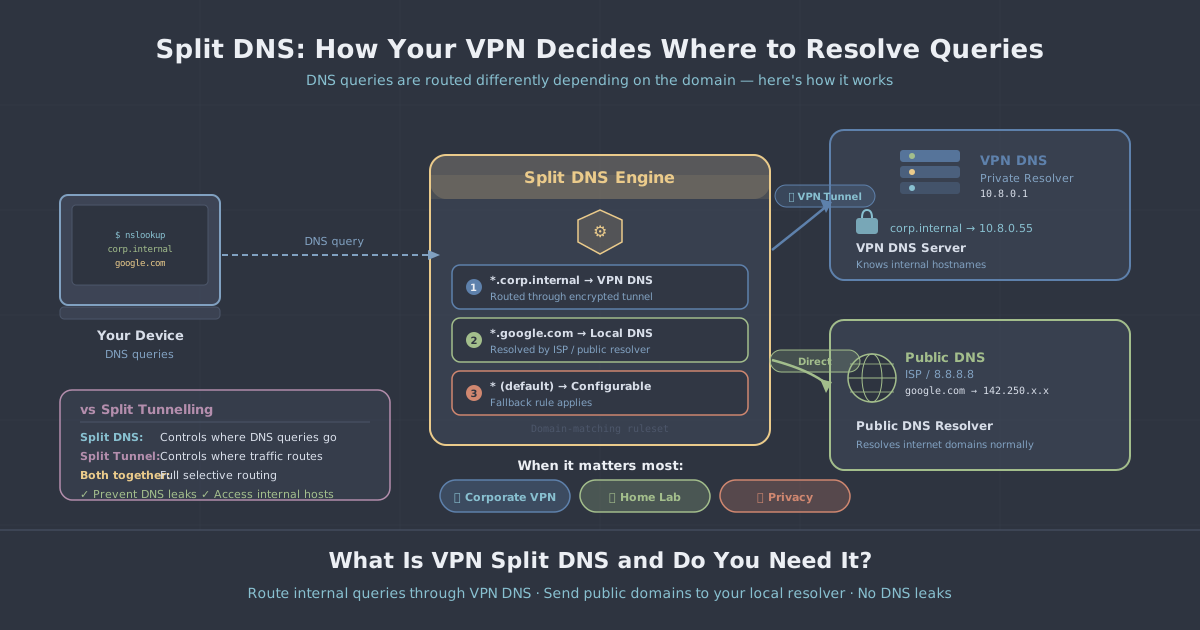
Split DNS is a configuration that maintains two separate DNS resolution paths simultaneously. Queries for certain domains—usually internal or private ones—are sent to one resolver, while queries for everything else go to another.
In a VPN context, the most common setup looks like this:
- Queries for internal domains (e.g.
fileserver.company.localorprinter.home) are resolved by the local network's DNS server. - Queries for everything else are resolved by the VPN provider's DNS server, inside the encrypted tunnel.
The result is that you can reach both internal resources and the public internet without having to disconnect and reconnect, manually change DNS settings, or route all traffic through a corporate gateway just to resolve an internal hostname.
Split DNS is sometimes called conditional DNS forwarding when described from the server side, because a DNS server forwards queries to different resolvers depending on which domain is being queried. From the client side, the term split DNS is more common.
How Split DNS Differs from Split Tunnelling
These two terms are easy to confuse because they sound similar and often work together, but they operate at different layers.
Split tunnelling is about network traffic routing. It determines which data packets travel through the VPN tunnel and which go directly to the internet via your regular connection. You might configure split tunnelling so that your work applications use the VPN while your streaming service uses your local connection directly.
Split DNS is specifically about name resolution. It determines which DNS server handles a given query, regardless of where the resulting traffic goes.
To make this concrete, consider a scenario where you have split tunnelling enabled so that traffic to your company's IP ranges goes through the VPN. If your company uses internal domain names like intranet.corp.local, those names won't resolve on a public DNS server—they only exist on your company's internal resolver. Without split DNS, your device sends the query through the VPN tunnel to the VPN provider's resolver, which has never heard of intranet.corp.local and returns an error.
Split DNS solves this by recognising that queries for *.corp.local should go to the corporate resolver, not the VPN's public resolver. The traffic itself might still go through the tunnel (that's split tunnelling's job), but the name resolution step uses the right server.
You can have split tunnelling without split DNS, split DNS without split tunnelling, or both together. They're complementary, not interchangeable.
When Split DNS Genuinely Helps
Remote work on a corporate network
This is the scenario where split DNS earns its keep most clearly. If you work remotely and your employer uses a VPN to give you access to internal tools—project management systems, internal wikis, development environments—those resources often live on private domain names. When you additionally run your own personal VPN for privacy, the two DNS configurations can clash. Split DNS lets you route corporate domain queries to your employer's resolver while keeping everything else private through your personal VPN.
Home network devices and local services
Many home networks assign friendly names to local devices: a NAS drive, a router admin panel, a home server, a network printer. These names are served by your router's built-in DNS resolver and mean nothing outside your home. If you're always connected to a VPN, these local names stop working because queries for them get forwarded to a resolver that can't answer them. Split DNS fixes this by keeping local domain queries on your local resolver.
Self-hosted services with private domains
If you run a self-hosted server—whether for personal projects or a small business—you may have configured private domain names for internal access. These are unreachable from the public internet and won't resolve on public DNS. Split DNS lets you reach them by local resolver while everything else goes through the VPN.
Latency-sensitive internal lookups
Even when an internal name technically resolves through a VPN resolver (because the VPN provider passes the query along), the round-trip adds latency to every lookup. For internal resources that need to be responsive, keeping DNS resolution local is noticeably faster.
The Privacy Trade-Off to Understand
Split DNS, like any split configuration, involves a trade-off. When you allow some queries to leave the VPN tunnel and reach a local or third-party resolver, those queries are not protected by the VPN's encryption on their way to that resolver. Your local network—or whoever operates the local resolver—can see those queries.
For strictly internal domains like *.local or *.internal, this is generally an acceptable trade-off. Nobody outside your network can see them, and the local resolver is, by definition, already authoritative for those names. Leaking the fact that you looked up fileserver.local to your own home router is not a meaningful privacy risk.
The risk increases if you configure split DNS carelessly and allow queries for public domains to reach your ISP's resolver. A well-implemented split DNS setup should only send private, internal, or explicitly defined domains to local resolvers—everything else should remain inside the tunnel. This is why precision in your domain matching rules matters.
If you want to understand more about how DNS leaks can undermine a VPN's privacy protections, our IP and DNS leak test lets you verify exactly where your queries are going.
How to Set Up Split DNS in Practice
The exact method depends on your operating system and VPN configuration. For WireGuard—the protocol used by default on PremierVPN—the configuration file includes a DNS field in the [Interface] section. Standard WireGuard treats this as the resolver for all queries when the tunnel is active, but several implementations support a DNS entry with search domains, and some clients honour split DNS rules when configured correctly.
A simplified WireGuard config snippet demonstrating how DNS is specified looks like this:
[Interface]
PrivateKey = <your_private_key>
Address = 10.0.0.2/32
DNS = 10.0.0.1, 8.8.8.8

[Peer]
PublicKey = <server_public_key>
AllowedIPs = 0.0.0.0/0
Endpoint = vpn.example.com:51820
For more granular control—routing only specific domains to a local resolver—you typically need OS-level configuration or a client that natively supports split DNS rules. On macOS, for instance, you can place domain-specific resolver files in /etc/resolver/. On Linux, systemd-resolved supports per-interface DNS with routing domains, which can coexist with a VPN interface cleanly.
If you're running PremierVPN on Ubuntu or Linux and want to configure fine-grained DNS routing, our Ubuntu setup guide covers the interface configuration in detail.
Do You Actually Need Split DNS?
For straightforward personal use—browsing, streaming, general privacy—you almost certainly don't need to think about split DNS at all. Your VPN handles DNS automatically, everything goes through the tunnel, and it works well.
You should consider split DNS if any of the following apply:
- You regularly connect to a corporate network that uses private internal domain names.
- Your home network has local hostnames you need to reach while the VPN is active.
- You self-host services on a private network with custom domain names.
- You use split tunnelling and some of your traffic goes to private destinations that require local name resolution.
If none of those describe your situation, your current DNS setup is probably fine. The no-logs policy that governs how PremierVPN handles your DNS queries means there's no meaningful downside to routing all queries through the VPN when you don't have a specific reason to do otherwise.
For users who are trying to get the best out of a more complex network setup—particularly those using a dedicated VPN server or configuring PremierVPN for remote work—split DNS is worth understanding and, in many cases, worth enabling. It's a precise tool for a specific problem, and it solves that problem well.
The short version: if your internal domains stopped resolving the moment you connected to a VPN, split DNS is almost certainly the fix you're looking for.