7 min read
Connecting from Iran — SlipNet Setup Guide
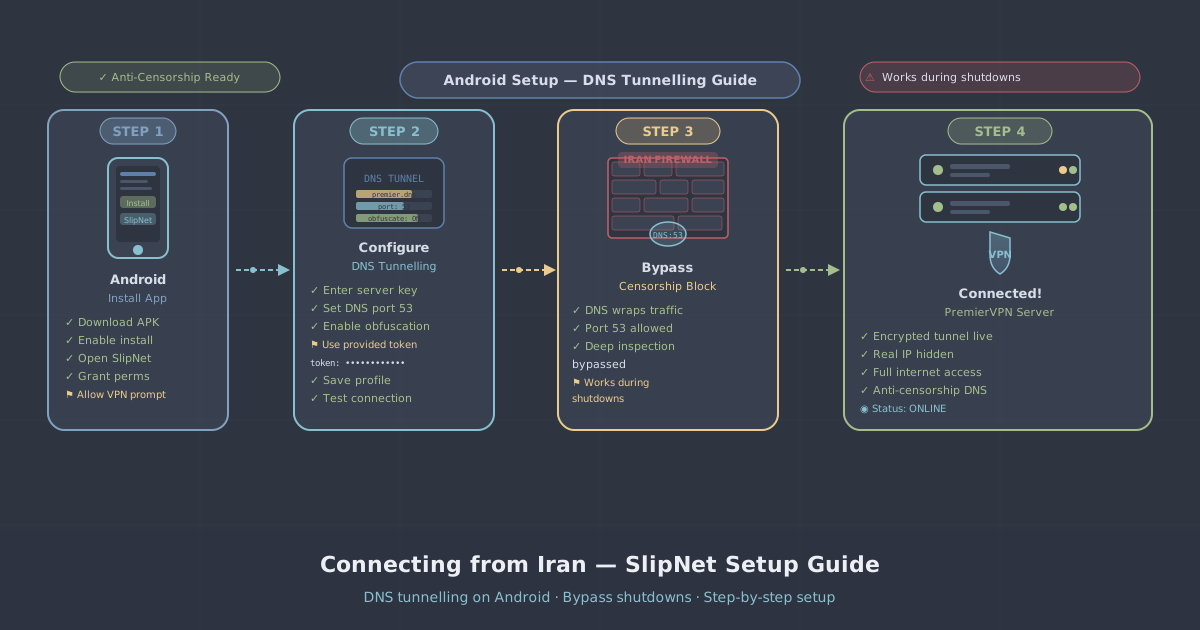
DNS tunnelling is currently the most reliable way to access the internet during Iran's internet shutdowns. Unlike conventional VPN connections, which are blocked at the protocol level, DNS tunnelling disguises your traffic as ordinary DNS queries — making it significantly harder for deep packet inspection (DPI) systems to detect and block.
This guide walks you through setting up SlipNet with PremierVPN's anti-censorship DNS tunnelling infrastructure, step by step.
Time needed: 30–45 minutes for first-time setup. After that, connecting takes seconds.
What You Need
- An Android phone
- An active PremierVPN subscription
- Patience — the DNS resolver scan takes 20–30 minutes, but you only do it once
iOS users: SlipNet is Android only. If you're on iPhone, log in to your SlipNet portal page and follow the NaiveProxy via Shadowrocket guide linked at the bottom of that page.
Step 1 — Download SlipNet
Download and install the SlipNet app from GitHub:
https://github.com/anonvector/SlipNet/releases
Download the latest .apk file and install it. If Android blocks the installation, go to Settings → Security → Allow from this source and try again.
Step 2 — Get Your Connection URI
- Log in to your PremierVPN account
- Go to your SlipNet page:
https://premiervpn.net/slipnet - If you haven't activated a server yet, click Activate on one of the available servers — Germany or Finland are recommended
- You'll see connection URIs grouped by protocol
Which Protocol to Choose
| Protocol | Recommendation | Notes |
|---|---|---|
| ⚡ VayDNS | Recommended | Best stealth, most reliable in Iran right now |
| 🔇 NoizDNS | Recommended | Randomises packet patterns to evade DPI |
| 🌐 DNSTT | Good fallback | Use if VayDNS/NoizDNS don't work |
| 💨 Slipstream | Speed priority | Fastest but less stealthy |
VayDNS Record Types
VayDNS is available in 9 different DNS record types. Each record type works differently depending on your ISP and network conditions. If one doesn't work, try another — this is one of the biggest advantages of VayDNS.
| Record Type | Notes |
|---|---|
| TXT | Default. Highest data capacity. Works on most networks. |
| CNAME | Good alternative when TXT is filtered. Works through most resolvers. |
| A | Lowest capacity but hardest for ISPs to block — every DNS query needs A records. |
| AAAA | IPv6 record type. Can bypass filters that only inspect IPv4 DNS traffic. |
| MX | Mail exchange records. Rarely filtered as blocking them breaks email. |
| NS | Nameserver records. Essential for DNS infrastructure — hard to block. |
| SRV | Service records. Uncommon target for filtering. |
| NULL | Raw binary. Fastest if the resolver supports it. |
| CAA | Certificate authority records. Very rarely inspected or filtered. |
Each record type is shown as a blue badge next to the URI on your SlipNet portal page (e.g. TXT, CNAME, A). The record type is automatically set in the URI — you don't need to change it manually after importing.
Tip: If VayDNS TXT doesn't connect, try CNAME or A first. These three cover most situations. If none of those work, try the less common types (MX, NS, NULL) — they're harder for ISPs to filter because blocking them would break core internet services.
Copy a VayDNS or NoizDNS URI — it begins with slipnet:// followed by a long encoded string.
Step 3 — Import into SlipNet
- Open the SlipNet app
- Tap the ⋮ three dots menu in the top-right corner
- Tap Import Profiles
- Paste your
slipnet://URI into the field - Tap Import
Your server now appears in the server list. Don't connect yet — you need working DNS resolvers first.
Step 4 — Scan for Working DNS Resolvers
This is the most important step. The default DNS resolvers you may be familiar with — such as 8.8.8.8 and 1.1.1.1 — are blocked in Iran. You need to find resolvers that are reachable from your specific network and ISP.
- Tap the ✏️ pencil icon next to your imported server
- Tap the blue banner that says Scan For Working Resolvers
- Set the scan mode to Simple
- Scroll down and set the resolvers list to Default (58,845 built-in resolvers)
- Scroll back up and tap Start Scan
Now wait 20–30 minutes. The app tests thousands of DNS resolvers to find ones that work from your network.
What to Look For
- Resolvers that pass the E2E test appear in green text
- These are the ones that can actually carry tunnel data — not just respond to queries
- You need at least 1, but aim for 3–8 working resolvers for reliability
Important: Resolvers that respond but do not pass the E2E test will appear to connect but won't load any websites. Only select resolvers marked E2E Passed (green).
Once you see several E2E Passed resolvers:
- Stop the scan
- Checkmark 3–8 E2E Passed resolvers (you can select up to 8)
- Tap Apply
The selected resolvers are now saved to your server profile.
Step 5 — Connect
- Go back to the server list
- Tap Connect on your server
A VPN icon will appear in your status bar. Open a browser and try loading a website. If it works — you're done! 🎉
Step 6 — Recommended Tweaks
If the connection is slow or unstable, apply these optimised settings. These have been confirmed working by users inside Iran.
Tap the ✏️ pencil icon next to your server and apply the following:
For VayDNS
| Setting | Value |
|---|---|
| Resolvers Mode | Reliable |
| Query Length | 131 bytes |
| Client ID Size (under Advanced) | 2 |
For NoizDNS
| Setting | Value |
|---|---|
| Resolver Mode | Fast |
| Spread Count | 5 |
| Authoritative | On |
| DNS Query Size | Full capacity (fastest) |
| Stealth Mode | On |
Troubleshooting
Connected but can't browse
- Go back and check your resolvers — only use ones marked E2E Passed (green)
- Remove any non-E2E resolvers and re-scan for new ones
- Try the SSH backend version of the same protocol (e.g.
noizdns-sshinstead ofnoizdns-socks)
Scan found zero E2E resolvers
- Your ISP may be heavily filtering right now. Try again at a different time of day — late night often works better
- Try a different scan mode: Advanced or E2E instead of Simple
- Switch between Wi-Fi and mobile data — different networks block different resolvers
Connection times out
- Re-run the DNS resolver scan. Working resolvers change frequently as ISPs adjust their filtering
- Try a different protocol — switch from VayDNS to NoizDNS or vice versa
- Try a different server — switch from Germany to Finland or vice versa
- Try a different VayDNS record type — if TXT doesn't work, try CNAME or A
Very slow speeds
- DNS tunnelling is inherently slower than a normal VPN — this is the trade-off for being undetectable
- Apply the recommended tweaks in Step 6 above
- Try Slipstream protocol for better speed (less stealthy but faster)
- Use fewer resolvers (3–4 instead of 8) — sometimes fewer is faster
- Try VayDNS NULL record type — it uses raw binary and can be faster if your resolver supports it
Was working yesterday but not today
- This is normal during shutdowns. ISPs constantly adjust their blocking
- Re-scan for resolvers — your previous ones may have been blocked
- Try a different protocol, server, or VayDNS record type
Quick Reference
| Step | Action |
|---|---|
| 1 | Download SlipNet from GitHub |
| 2 | Copy a VayDNS or NoizDNS URI from premiervpn.net/slipnet |
| 3 | Import the URI into SlipNet (⋮ → Import Profiles → Paste → Import) |
| 4 | Scan for resolvers (✏️ → Scan → Simple → Default list → Start → Wait 20–30 mins) |
| 5 | Select E2E Passed resolvers (green) → Apply |
| 6 | Tap Connect |
Available Servers
| Server | Protocols | VayDNS Record Types |
|---|---|---|
| 🇩🇪 Germany #1 | VayDNS, NoizDNS, DNSTT, Slipstream, NaiveProxy, StunTLS | TXT, CNAME, A, AAAA, MX, NS, SRV, NULL, CAA |
| 🇩🇪 Germany #2 | VayDNS, NoizDNS, DNSTT, Slipstream, StunTLS | TXT, CNAME, A, AAAA, MX, NS, SRV, NULL, CAA |
| 🇫🇮 Finland #1 | VayDNS, NoizDNS, DNSTT, Slipstream, NaiveProxy, StunTLS | TXT, CNAME, A, AAAA, MX, NS, SRV, NULL, CAA |
Need Help?
If you're still having trouble connecting, we're here to help:
- Live Chat — use the chat bubble on our portal (bottom-right corner)
- Support Ticket — open a ticket at premiervpn.net/tickets
This guide is based on real feedback from PremierVPN users successfully connecting from inside Iran. Last updated: May 2026.