9 min read
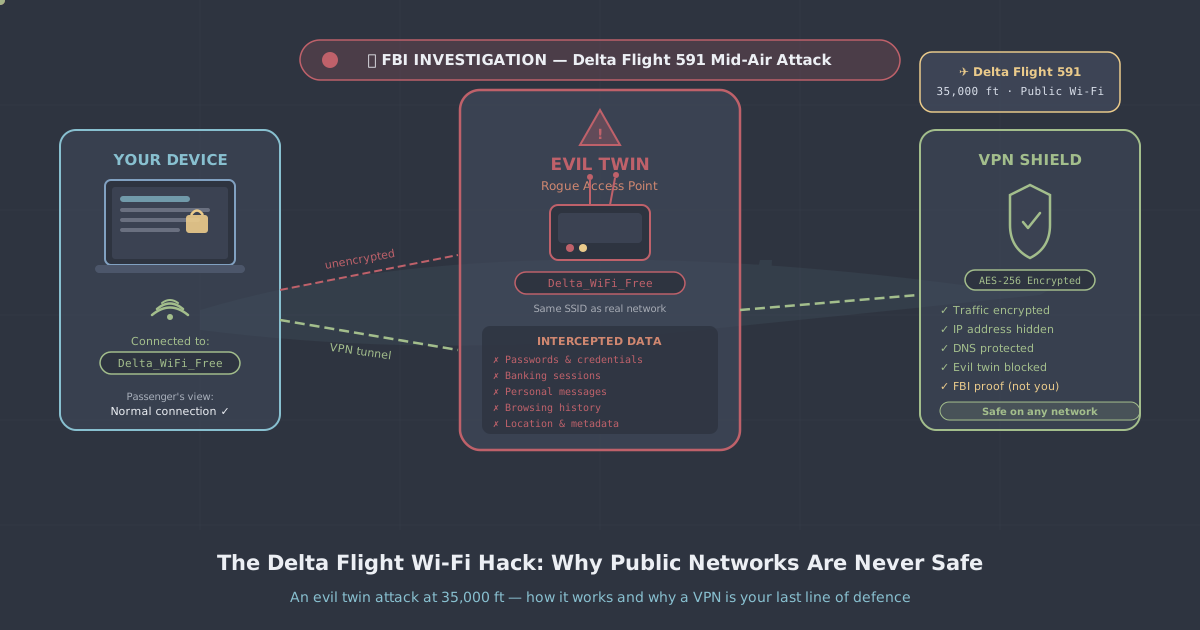
On 10 August 2026, passengers aboard Delta Flight 591 from Las Vegas to Atlanta unwittingly became the subjects of a live cybersecurity incident. Someone on that flight—or close enough to it—broadcast a rogue Wi-Fi network named Delta WiFi Fast, designed to look like the aircraft's legitimate onboard connection. Delta's crew noticed the anomaly and disabled the real Wi-Fi for roughly 30 minutes while they dealt with the situation. The FBI's Atlanta field office has since confirmed it is investigating. Delta locked the SkyMiles accounts of every passenger on the flight pending identity re-verification.
This is not a theoretical attack from a security textbook. It happened to several hundred ordinary travellers on a domestic US flight, the day after DEF CON 34—one of the world's largest hacking conferences—wrapped up in Las Vegas. Investigators have not confirmed who was responsible or their affiliation, but the timing is not lost on anyone following the story.
For UK travellers who regularly use airport lounges, hotel networks, and in-flight Wi-Fi, the Delta incident is a useful moment to understand exactly how these attacks work, what the real risks are, and what you can do about them.
What Is an Evil Twin Attack?
An evil twin attack is straightforward in concept and, unfortunately, straightforward to execute. An attacker creates a Wi-Fi access point with a name that matches—or closely resembles—a legitimate network. On Delta Flight 591, the rogue network was called Delta WiFi Fast; plausible enough that a tired traveller would not question it.
The attack works because of how Wi-Fi clients behave. Most devices will auto-connect to a known network name, and when two networks share the same name (SSID), the device typically connects to whichever is broadcasting the stronger signal. An attacker with a portable router or even a modern laptop running hotspot software can easily overpower the legitimate signal, particularly in an enclosed space like an aircraft cabin.
Once your device connects to the rogue access point, the attacker is sitting between you and the internet—a classic man-in-the-middle position. They can:
- Present a fake captive portal (a login page) to harvest your credentials
- Intercept unencrypted traffic passing through the connection
- Inject malicious content into pages you visit over plain HTTP
- Log DNS queries to build a picture of every site you attempt to reach
In the Delta case, the fake network almost certainly presented a login page mimicking Delta's real captive portal. Anyone who entered their SkyMiles login details would have handed them directly to the attacker—which is presumably why Delta moved to lock those accounts.
Why Planes, Airports, and Hotels Are Particularly Risky
Public Wi-Fi is a known risk in general, but certain environments concentrate the problem.
Aircraft
An aircraft cabin is a sealed tube with limited signal escape. A rogue access point inside it can dominate the wireless environment with minimal hardware. Passengers are confined, often tired, and want internet access—so they connect quickly without scrutinising the network name. Cabin crew are not cybersecurity analysts. The Delta case shows how long it can take for a rogue network to even be noticed.
Airport terminals
Airports are high-footfall environments where people expect to see multiple Wi-Fi networks. A network called Heathrow Free Wi-Fi or Gatwick Airport WiFi raises no eyebrows. Attackers can sit in a departure lounge with a portable device and harvest credentials from hundreds of travellers over the course of a few hours, then walk onto their flight and disappear.
Hotels
Hotel networks are often poorly segmented, meaning devices on the same network can sometimes communicate with each other. An attacker staying in the same hotel can run an evil twin against the hotel's own network name and intercept traffic from guests on every floor. Business travellers who access corporate systems over hotel Wi-Fi without a VPN are a particular target.
What Data Is Actually at Risk?
It depends on what you do while connected, and on how the sites and services you use handle encryption.
HTTPS protects the content of your communication with a website, but it does not hide the fact that you are communicating with it, and it does not protect you from a fake captive portal that appears before your browser ever reaches a real site. If you type your email and password into what looks like a Delta login page but is actually a form served by an attacker's laptop, HTTPS is irrelevant—you handed over the credentials directly.
Beyond credentials, an attacker in a man-in-the-middle position can see:
- Every domain you visit (even over HTTPS, DNS queries are often unencrypted)
- Metadata about your sessions—timing, volume, destinations
- Any traffic over plain HTTP, including older apps and some email clients
- Session cookies, if they are not secured with the correct flags
For most travellers, the immediate risk is credential theft—loyalty programme logins, email accounts, anything where you authenticate through a captive portal or habit. For business travellers, the stakes can include corporate VPN credentials, cloud application logins, and confidential documents.
How a VPN Neutralises the Attack
A VPN does not stop your device from connecting to a rogue access point—if the evil twin is broadcasting a stronger signal, your device may still join it automatically. What a VPN does is ensure that even if you are connected to a malicious network, your traffic is protected.
When your VPN is active, all traffic leaving your device is encrypted inside a tunnel before it reaches the access point. The attacker operating the rogue network sees encrypted data addressed to your VPN server—nothing useful. They cannot read your traffic, they cannot intercept your credentials in transit, and they cannot inject content into your sessions.
The one scenario where this does not fully protect you is the fake captive portal itself. If the evil twin presents a login page before your VPN has connected, and you enter credentials into that page, those credentials are exposed. The practical defence is to treat any captive portal login with suspicion—if a network asks you to log in with your airline account or email address rather than a simple access code, pause before entering anything.
The best habit is to enable your VPN before connecting to any public network, and to set it to connect automatically on untrusted Wi-Fi. PremierVPN's Premium plan supports this on all major platforms, using WireGuard by default for a fast, low-latency connection that works well even on the variable bandwidth of in-flight Wi-Fi.
Choosing the Right Protocol for Travel
Not all VPN protocols behave equally in travel environments. Some networks—particularly in airports and hotels—throttle or block traffic that looks like a VPN. This is where protocol choice matters.
| Protocol | Speed | Obfuscation | Best for |
|---|---|---|---|
| WireGuard | Excellent | None | Most public Wi-Fi, in-flight networks |
| WireGuard Stealth | Very good | Yes | Networks that block standard VPN traffic |
| OpenVPN | Good | Partial | Compatibility with older network infrastructure |
| VLESS+REALITY | Good | Strong | Heavily restrictive networks (China, Iran, Russia) |
For most airport and in-flight use, WireGuard is the right choice—it is fast, establishes quickly, and handles intermittent connectivity gracefully. If you are travelling to a country with deep packet inspection or VPN restrictions, PremierVPN X for Windows and PremierVPN X for macOS use VLESS+REALITY, a protocol designed to be indistinguishable from regular HTTPS traffic. You can read more about how that works in our VLESS+REALITY protocol guide.
Practical Steps Before Your Next Flight
The Delta incident is a useful prompt to run through a short checklist before you travel.
- Install and configure your VPN before you leave home. Setting up a VPN in an airport, rushing to catch a flight, is not ideal. Download the Windows app, macOS app, iOS app, or Android app while on your trusted home network and make sure it connects successfully.
- Enable auto-connect on untrusted networks. Most VPN apps allow this in settings. It means the tunnel comes up the moment your device joins an unfamiliar Wi-Fi network, before any application traffic is sent.
- Be sceptical of captive portals. If a network asks you to log in with airline or hotel loyalty credentials, ask yourself whether you are certain you are on the real network. When in doubt, use mobile data to verify what the legitimate login page should look like.
- Disable Wi-Fi auto-join for networks you do not recognise. On iOS, you can set individual networks to not auto-join. On Android and Windows, you can manage saved networks. Removing saved public networks—airport Wi-Fi you used once six months ago—reduces the auto-connect attack surface.
- Keep your loyalty programme credentials unique. If your SkyMiles password is the same as your email password, a stolen SkyMiles login becomes a much larger problem. Use a password manager.
A Note on the DEF CON Timing
The flight departed Las Vegas on 10 August 2026, the day after DEF CON 34 concluded. That timing has attracted significant attention, and understandably so—DEF CON attracts thousands of security researchers, and Las Vegas to Atlanta is a common route for those flying home via a hub. Investigators have not confirmed any connection between the conference and the attack, and it would be unfair to assume one. Security researchers attend DEF CON to share and learn defensive techniques; the vast majority have no interest in attacking civilians on a commercial flight.
What the timing does illustrate is that whoever carried out this attack had at least a working knowledge of wireless security tooling. Evil twin attacks are not exotic—the tools to run one are freely available and documented—but executing one on a domestic flight with FBI consequences requires a certain level of deliberateness. This was not an accident or a misconfigured device.
Summary
The Delta Flight 591 incident is the kind of event that makes abstract security advice concrete. Evil twin attacks are real, they happen in environments most people consider routine, and the consequences—locked accounts, credential theft, potential identity fraud—are genuinely disruptive.
The good news is that a VPN running on your device makes the attack largely moot. Even if your phone connects to a rogue access point, an active VPN tunnel means your traffic arrives at the attacker encrypted and unreadable. Combined with sensible habits around captive portals and unique passwords, it is a robust defence for travellers who cannot always control which network their device joins.
If you want to understand the broader picture of what a VPN does and does not protect against, our VPN explainer covers the fundamentals without the marketing noise. And if you want to check whether your current setup leaks your real IP address or DNS queries, our IP leak test takes about thirty seconds to run.