9 min read
Most people securing their connection with a VPN worry about two things: IP leaks and DNS leaks. Both are legitimate concerns, and both are worth checking regularly. But there is a third category of exposure that receives far less attention—VPN fingerprinting. It is the process of identifying that someone is using a VPN at all, purely by analysing traffic patterns, without ever breaking the encryption or knowing what is inside the tunnel.
Understanding VPN fingerprinting matters because the threat model is different from a leak. A leak reveals something specific—your real IP address, a DNS query. Fingerprinting reveals something structural—that you are running an encrypted tunnel, which protocol it likely uses, and potentially which software or provider is responsible. In some countries, that structural fact alone is enough to trigger scrutiny or blocking.
This article explains what VPN fingerprinting is, how it works in practice, who actually uses it, and what measures genuinely reduce your exposure to it.
What VPN Fingerprinting Actually Means
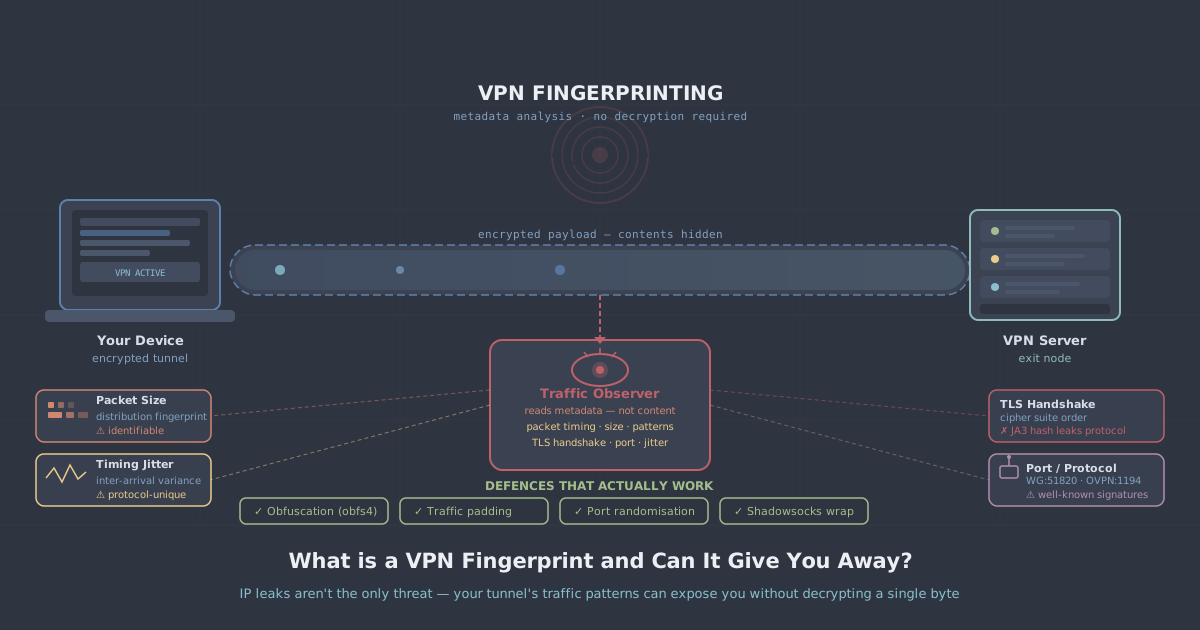
When your device communicates over the internet, it produces traffic that has observable characteristics even when the payload is encrypted. Packet size, timing intervals, connection duration, handshake patterns, port usage, and the sequence in which bytes appear at the start of a connection—all of these can be observed by anyone positioned between you and your destination. That includes your ISP, a network administrator, and any deep packet inspection (DPI) system sitting on the infrastructure you are using.
VPN fingerprinting is the use of those observable characteristics to classify traffic as belonging to a specific VPN protocol—or to a VPN in general. The process does not require decrypting anything. It works the way a trained customs officer recognises a particular type of luggage by its shape and handle, not by opening it.
Different VPN protocols leave different fingerprints. WireGuard uses UDP, has a distinctive handshake structure, and produces packets with recognisable size distributions. OpenVPN over TCP produces a different pattern. Even when ports are changed from their defaults, the underlying behaviour often remains identifiable to a well-configured DPI system.
The Techniques Used to Detect VPN Traffic
Port-based detection
The simplest form of detection is port analysis. WireGuard defaults to UDP port 51820. OpenVPN defaults to UDP 1194 or TCP 443. Network administrators and automated systems can flag or block traffic on these ports with minimal effort. Changing the port helps against unsophisticated detection but does not defeat DPI.
Protocol fingerprinting via handshake analysis
Every VPN protocol begins a connection with a handshake—an exchange of cryptographic material and parameters. The byte patterns in those initial packets are often distinctive enough to identify the protocol even on a non-standard port. WireGuard's handshake initiation message, for example, has a fixed first byte of 0x01 and a known length of 148 bytes. A DPI engine that knows to look for this can identify WireGuard traffic with high confidence.
Traffic flow analysis
Beyond individual packet inspection, flow-level analysis looks at aggregate behaviour over time. Metrics such as inter-arrival times, packet size variance, the ratio of upstream to downstream traffic, and session duration can be fed into a statistical classifier. Machine learning models trained on known VPN traffic can achieve high accuracy at classifying encrypted flows even when the payload and handshake are both opaque.
TLS certificate and SNI analysis
When OpenVPN or similar protocols run over TLS, the TLS handshake itself can be fingerprinted. JA3 fingerprinting, for instance, produces a hash of TLS client hello parameters—cipher suites, extensions, elliptic curves—that can identify specific TLS implementations. A VPN client using a non-browser TLS stack will produce a different JA3 hash from a web browser, making it distinguishable from ordinary HTTPS traffic.
Who Uses VPN Fingerprinting and Why
VPN fingerprinting is not theoretical. It is actively deployed in several real-world contexts.
- National censorship infrastructure: Countries with comprehensive internet controls use DPI at the network level to detect and block VPN protocols. This is one of the primary methods used to disrupt VPN access in places with strict online restrictions.
- Corporate network monitoring: Enterprise security teams use DPI appliances to enforce acceptable use policies. Detecting that an employee is tunnelling traffic through an external VPN is a routine capability of these systems.
- ISP traffic management: Some ISPs have used protocol detection to apply different quality-of-service treatment to VPN traffic, though this practice varies by jurisdiction and regulatory environment.
- Academic and security research: Researchers study VPN traffic classification to understand privacy risks and to develop countermeasures. The published literature on this topic is extensive and informs both attack and defence.
It is worth being clear: in most everyday use cases—streaming, remote working, general privacy on public Wi-Fi—VPN fingerprinting is not a meaningful threat. Your ISP knowing you are using a VPN is, in most jurisdictions, unremarkable. The threat becomes material when you are operating in an environment where VPN use itself is restricted or monitored.
What Does Not Effectively Mitigate Fingerprinting
Several common assumptions about fingerprint resistance turn out to be weaker than they appear.
Changing the default port defeats port-based blocklists but not DPI. Running WireGuard on port 443 does not make it look like HTTPS to an inspection system that analyses the handshake structure.
Using a well-known VPN protocol on a non-standard port is similarly limited. The protocol's characteristic byte patterns persist regardless of which port carries them.
Routing over TCP instead of UDP adds some ambiguity but still leaves protocol-level markers that DPI systems can detect.
None of these measures are worthless—they raise the bar for casual detection—but they do not constitute serious fingerprint resistance against a determined inspection system.
What Actually Reduces VPN Fingerprinting Risk
Traffic obfuscation
Obfuscation rewrites the traffic so that it no longer looks like a known VPN protocol. Instead of simply encrypting the payload, an obfuscation layer transforms the packet structure, timing, and byte patterns to resemble something benign—typically ordinary HTTPS or TLS traffic. This directly addresses the mechanism that DPI relies on.
WireGuard Stealth, supported by PremierVPN, applies an obfuscation layer on top of standard WireGuard. The result is traffic that does not present the recognisable WireGuard handshake to an external observer. For users in environments where standard VPN protocols are actively detected and blocked, this represents a meaningful practical improvement.
VLESS + REALITY
The VLESS+REALITY protocol takes a more sophisticated approach. REALITY borrows the TLS fingerprint of a real, popular website's server, so that the traffic appearing on the wire is cryptographically indistinguishable from a legitimate TLS connection to a known domain. There is no custom handshake pattern for a DPI engine to learn and block, because the handshake genuinely looks like TLS to a major service.
This is the technology behind PremierVPN X for macOS and PremierVPN X for Windows. It was specifically designed for use in highly restrictive network environments where standard protocols and even obfuscated protocols are blocked.
Padding and timing normalisation
Some obfuscation tools also address traffic flow analysis by normalising packet sizes and adding artificial timing variation to disrupt the statistical signatures that machine learning classifiers rely on. This is a more resource-intensive mitigation and is not universally implemented, but it addresses the deeper layer of flow-level fingerprinting.
How to Know If Fingerprinting Is a Concern for You
The practical question is whether your threat model actually includes VPN fingerprinting. For most users, it does not. If you are using a VPN to secure traffic on a hotel Wi-Fi network, protect your activity from your ISP, or access geo-restricted content, the fact that your ISP can tell you are using a VPN is not a meaningful problem. You can verify that your actual IP and DNS queries are not leaking using our IP leak test, and that covers the realistic risk for most contexts.
Fingerprinting becomes a practical concern in specific situations:
- You are connecting from a country where VPN use is restricted or surveilled—for more on this, see our guides on using a VPN in China and using a VPN in Iran.
- You are on a corporate or institutional network with active DPI enforcement.
- You are a journalist, activist, or researcher operating in an environment where your use of a VPN itself carries risk.
In those cases, using a standard WireGuard or OpenVPN connection—even with a no-logs policy and zero leaks—is not enough. The structural fact of the tunnel can be observed before encryption begins. Obfuscation or a protocol like VLESS+REALITY is the appropriate response.
A Practical Summary
VPN fingerprinting is a real technique that operates at a layer most users do not think about. It does not break encryption and it does not reveal your traffic contents. What it reveals is that an encrypted tunnel exists, which protocol it uses, and sometimes which software created it. For the majority of VPN users, that is not a problem. For users in restrictive environments, it is the primary obstacle to reliable VPN access.
If your concern is ordinary privacy—protecting your data from passive surveillance, securing yourself on public networks, keeping your browsing away from your ISP—then checking for IP and DNS leaks remains the most important practical step. Standard WireGuard, as used across PremierVPN's personal VPN plans, handles that well.
If your concern is operating in an environment where VPN traffic itself is targeted, the right tool is one that removes the fingerprint entirely. WireGuard Stealth raises the bar considerably. VLESS+REALITY, available through PremierVPN X, goes further—producing traffic that is structurally indistinguishable from ordinary TLS to a major service. That is not a marketing claim; it is a consequence of how the protocol is designed, and it is why it remains effective in environments where other approaches have been systematically blocked.
Know your threat model. Choose the tool that matches it.