8 min read
When you connect to a VPN, one of the first decisions you face is which server location to use. Most people tap the nearest option and move on. That works well enough for basic privacy, but it leaves a lot on the table—and occasionally causes problems that are easy to avoid once you understand what server location actually controls.
This guide breaks down the mechanics: what a VPN server location does, which factors should drive your choice, and how to think through the decision for different use cases—whether you want the fastest connection, a specific IP address, or access to content from another country.
What a VPN Server Location Actually Controls
When you connect to a VPN server, your traffic is encrypted on your device, routed to that server, and then sent onward to whatever website or service you are using. From the perspective of that website, your connection appears to originate from the server's location—not your own.
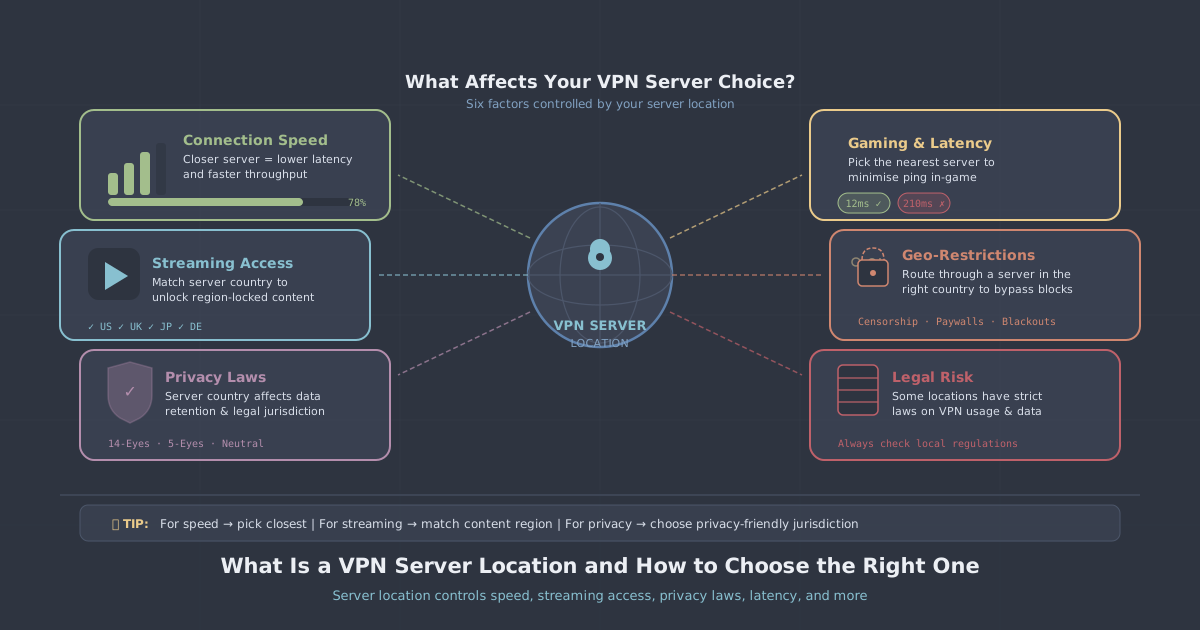
That means server location controls three things simultaneously:
- Your visible IP address — you inherit an IP from the country and city where the server sits
- Your apparent geographic location — services that use IP geolocation will place you in the server's country
- The physical path your data travels — which directly affects latency and, to a lesser extent, throughput
These three effects are often in tension with one another. A server that gives you the IP address you need may not be the fastest one available. Understanding the trade-offs helps you make deliberate choices rather than accidental ones.
How Distance Affects Speed
Raw internet speed is constrained by physics. Data travels at roughly two-thirds the speed of light through fibre, and every router hop along the way adds a small delay. The further your data has to travel—from your device to the VPN server, and then from the server to the destination—the higher the latency.
Latency matters differently depending on what you are doing:
- Browsing and streaming — moderate latency (under 80–100 ms) is generally fine for both
- Video calls — noticeable above roughly 100–150 ms; packet jitter matters as much as raw latency
- Online gaming — even 40–60 ms extra can be significant in fast-paced titles
- Large file downloads — latency matters less here; server bandwidth and load matter more
For most everyday use, connecting to the nearest server in your country is the sensible default. If you are in the UK, a London or Manchester server will typically give you the lowest latency. PremierVPN's server locations include options across Europe and beyond, so it is usually straightforward to find something geographically close.
One caveat: nearest is not always fastest. A server that is slightly further away but less congested—fewer users sharing it at peak time—can outperform a closer server under load. If you notice sluggish speeds, try a neighbouring location before assuming the VPN itself is the bottleneck.
Choosing a Location for Accessing Geo-Restricted Content
Some online services restrict their content library or availability by country. Streaming platforms serve different catalogues in different regions. Some news sites block readers outside a specific country. Certain software licences or pricing pages are geographically gated.
In these cases, the correct server is the one in the country whose content you want to access—regardless of where that country sits relative to you. If you want to watch something available only in Germany, you connect to a German server. The service sees a German IP address and serves you accordingly.
A few practical points worth knowing:
- City-level accuracy is not guaranteed. An IP from a UK server might geolocate to London on one database and Manchester on another. For most streaming purposes this does not matter, but for services with city-level restrictions it can.
- Some platforms actively work to detect and block VPN IP addresses. If a shared server gets blocked, switching to a different server in the same country often resolves it. A dedicated IP address reduces this risk significantly because the IP is yours alone and has no history of VPN-associated behaviour.
- Your connection speed will decrease as server distance increases. Streaming at 4K from a server on the other side of the world is feasible on a fast connection but will stress a slower one.
Server Location and Privacy
Privacy-conscious users sometimes choose server location based on jurisdiction—the legal environment of the country where the server physically sits. The reasoning is that a server in a country with strong data retention laws or active surveillance programmes represents a different risk profile than one in a more permissive jurisdiction.
This is worth understanding clearly. With a strict no-logs policy, there is no session data, no connection timestamp, and no IP address record for any authority to request—regardless of which server you used. Jurisdiction only becomes relevant if logs exist. If none are kept, there is nothing to hand over.
That said, if you are particularly concerned about a specific country's legal environment, you can simply avoid connecting through a server there. That is a reasonable preference to act on. Just do not assume that avoiding certain server locations compensates for a VPN provider that does keep logs. The logging policy matters far more than the flag on the server.
Choosing a Location for Specific Use Cases
Gaming
For gaming, latency is the primary concern. Connect to the server closest to the game's backend infrastructure—which is usually the server geographically closest to you, but not always. Some games route their servers through specific regions; if you know the game hosts its European servers in Frankfurt, a German VPN server will likely perform better than a UK one if the routing path is shorter.
A VPN can also help in situations where your ISP's routing to a game server is poor. In those cases, the VPN creates an alternative path that bypasses the congestion point—so the best server is the one that produces the lowest in-game ping, which you may need to test empirically. PremierVPN's gaming VPN page has more detail on this.
Remote Work
If you are connecting to a corporate network or accessing work resources, you typically want a server in the same country as those resources. Some organisations require connections to originate from a specific country for compliance or licensing reasons. A dedicated VPN server is worth considering here—it gives a stable, known IP address that can be whitelisted on corporate firewalls without the churn that comes from shared IP pools.
Travel
When travelling abroad, your home country's services may become unavailable or behave differently—banking apps sometimes flag foreign logins, and some services are simply not licensed for use outside the UK. Connecting to a UK server while abroad restores your usual apparent location and generally resolves these issues. See the travel VPN page for practical notes on using a VPN while away from home.
Restrictive Networks
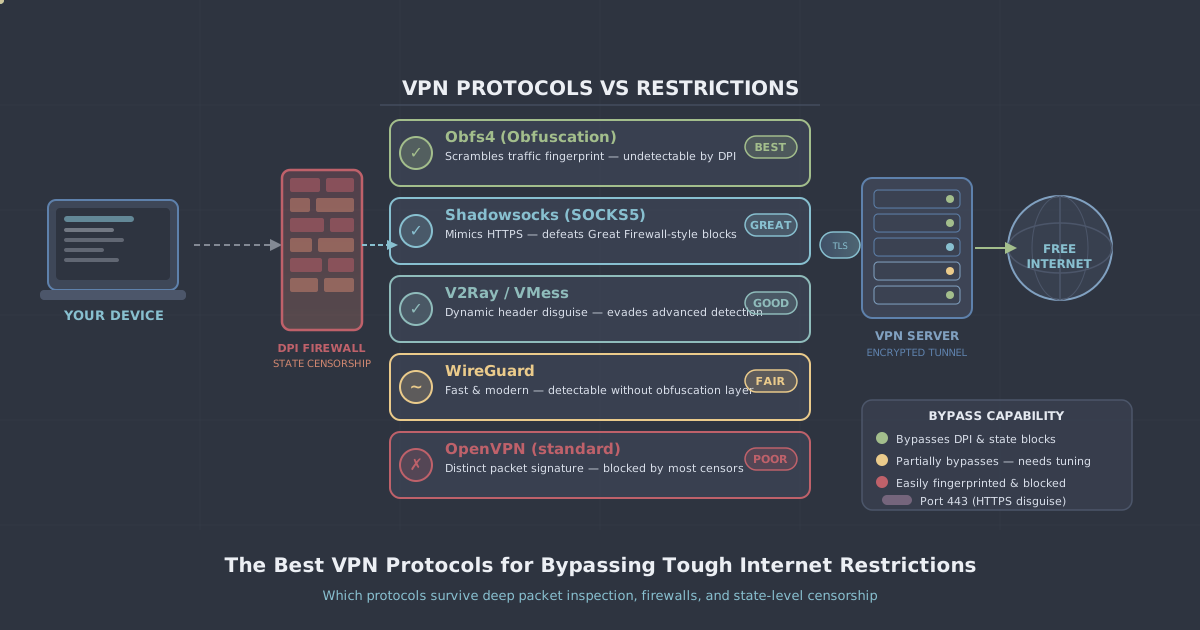
In countries where VPN traffic is actively blocked or throttled—China, Iran, and Russia are the most prominent examples—standard server selection is not enough. Deep packet inspection can identify and block WireGuard and OpenVPN traffic regardless of which server you connect to. In these environments, the protocol matters as much as the location.
PremierVPN X uses the VLESS+REALITY protocol, which is specifically designed to be indistinguishable from normal HTTPS traffic. If you are in or travelling to a country with aggressive internet controls, the VLESS+REALITY protocol page explains how it works, and the Windows and macOS apps support it directly.
A Practical Framework for Server Selection
Rather than a single rule, think of server selection as answering a short set of questions in order:
- Do you need a specific country IP? If yes, that country determines your server. Pick the city within it that has the best speed.
- Is latency critical? If yes—gaming, video calls—choose the geographically nearest server to your destination (not necessarily to you).
- Is the connection unstable or slow? Try adjacent servers in the same region before changing protocol or blaming the VPN.
- Are you on a restrictive network? Switch to PremierVPN X and use a server in a country with open internet access.
- None of the above? The nearest server to your physical location is the right default.
You can check the full list of available server locations on the server locations page. If you have not yet set up the app, the setup guides for Windows, macOS, iOS, and Android walk through the process step by step.
Summary
Server location controls your visible IP address, your apparent country, and the latency of your connection. For most everyday use, the nearest server is the right choice. When you need a specific country's IP—for streaming, travel, or work—choose a server there and accept the latency trade-off. For latency-sensitive tasks like gaming, prioritise proximity to the service rather than proximity to yourself. And for restrictive networks, the protocol matters as much as the location.
Taking thirty seconds to think through which server you actually need, rather than always defaulting to the same one, will noticeably improve your experience in most of the situations where a VPN genuinely matters.