9 min read
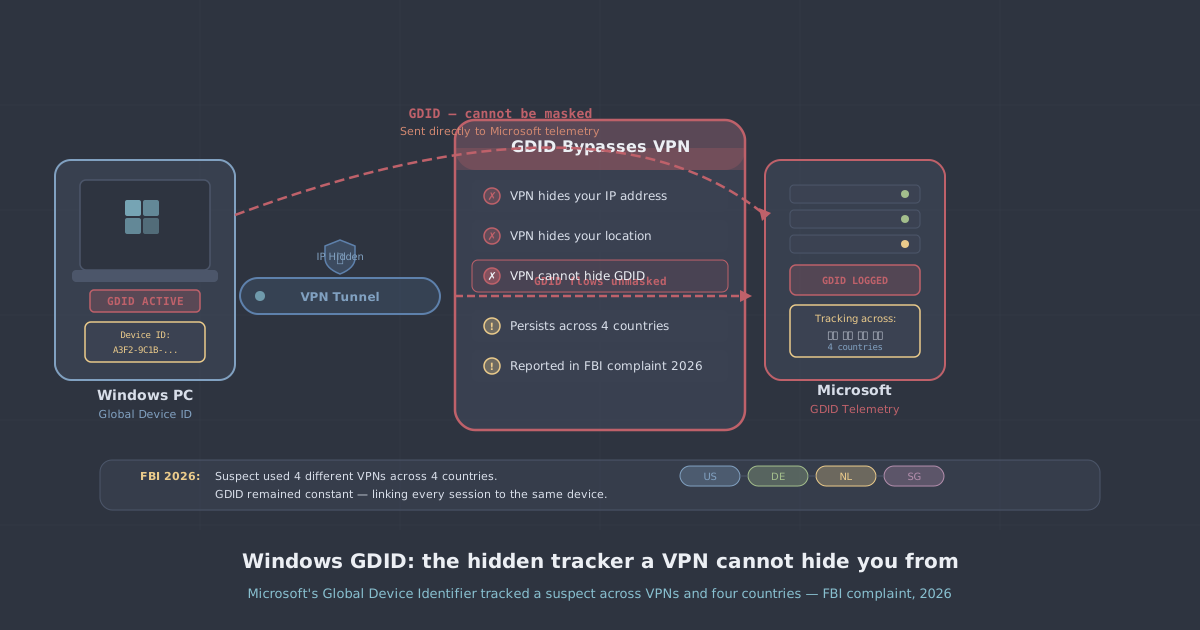
In early July 2026, a US federal complaint was unsealed that contained a detail most privacy researchers had never encountered in the wild: Microsoft's Global Device Identifier, or GDID, had been used by the FBI to track an alleged cybercriminal across VPN connections, proxy servers, and four separate countries over roughly eight months. The suspect, Peter Stokes, was arrested at Helsinki Airport in April 2026 and is alleged to be a member of Scattered Spider. The GDID link connected him across locations in New York, Tallinn, Thailand, and Estonia—despite him rotating IP addresses throughout.
For most people, the revelation was the first time they had heard of GDID at all. It does not appear in any consumer-facing Microsoft privacy materials. It has no published opt-out mechanism. And critically, it operates entirely outside the protection that a VPN provides. This article explains what GDID is, how it works, why VPNs cannot help, and what options—limited as they are—actually exist.
What is the Windows Global Device Identifier?
According to the federal complaint, the GDID is described as "a persistent, device-level identifier designed to uniquely identify an installation of a Windows operating system on a device." Microsoft confirmed its existence when asked about the case. The identifier is stored in the Windows registry and is tied to the Windows installation itself—not to a user account, not to a network adapter, and not to an IP address.
That last point matters enormously. Every time you connect through a VPN, your IP address changes. Your DNS queries are rerouted. Your traffic is encrypted in transit. But none of that touches the Windows registry. The GDID sits below all of that, at the operating-system level, and it goes wherever that Windows installation goes—regardless of what network it is on.
Before this case, GDID had been documented only in an obscure Azure Monitor schema reference, the kind of technical specification that almost nobody outside Microsoft's telemetry engineering team would read. It was absent from all consumer privacy documentation, from Windows privacy dashboards, and from the standard hardening guides that security-conscious users follow. For practical purposes, it was invisible.
How GDID is transmitted—and why most privacy guides miss it
Standard Windows privacy guides typically focus on disabling telemetry through Group Policy, the Settings app, or the Diagnostic Data Viewer. These approaches target the standard telemetry pipeline—the data collection mechanism Microsoft acknowledges publicly and provides (limited) controls for.
GDID does not travel through that pipeline. According to details emerging from the Stokes case and subsequent researcher analysis, it is transmitted via two separate Windows services:
- Connected Devices Platform (CDP)—the infrastructure behind features like cross-device notifications, Phone Link, and shared clipboard between Windows devices.
- Delivery Optimization—the peer-assisted Windows Update service that can use other devices on local and wide-area networks to distribute update packages.
Because these services are categorised as functional rather than diagnostic, they are not affected by the telemetry controls that privacy-focused users typically configure. Disabling them via the Settings app or registry does prevent GDID transmission through those channels, but it also breaks Windows Update delivery and cross-device features—and Microsoft has confirmed that fully disabling GDID itself is not possible without breaking Windows activation and Universal Windows Platform (UWP) applications.
In other words, it is baked into the functioning of Windows in a way that cannot be cleanly separated.
Why a VPN cannot protect you from GDID
A VPN works at the network layer. It encrypts your traffic between your device and a VPN server, masks your real IP address from the sites and services you connect to, and prevents your ISP from seeing what you are doing. It is an effective tool for what it is designed to do.
But GDID is not a network-layer identifier. It is a device-layer identifier. When Windows transmits the GDID to Microsoft's servers via CDP or Delivery Optimization, that traffic travels inside the VPN tunnel—encrypted, with your IP address masked—but it still carries the GDID. Microsoft receives the data at the other end and can read the identifier. The VPN hides who made the connection from a network observer, but it does not hide what was in the connection from the destination server, which in this case is Microsoft.
This is a fundamental constraint of how VPNs work, not a flaw in any particular implementation. Even a well-configured VPN with a verified no-logs policy and strong encryption cannot suppress data that the operating system itself is generating and sending to a third party. Understanding the limits of what a VPN protects is as important as understanding what it does protect—if you want a broader grounding in that, our introduction to VPNs covers the fundamentals.
The transparency problem
What makes the GDID situation particularly significant is not just the technical capability—it is the absence of any public accountability around it.
Microsoft has no transparency reports covering GDID disclosures. There is no published mechanism for users to request their GDID, audit who has received it, or opt out of its collection. The identifier does not appear in Microsoft's Privacy Dashboard, in Windows privacy settings, or in the documentation that privacy-conscious users and security professionals rely on when hardening a Windows system. It was, for all practical purposes, undisclosed until a federal court document made it impossible to ignore.
Privacy researchers have noted that this is a meaningful gap in the existing framework. Most discussions of Windows privacy assume that if you disable the right telemetry settings and route your traffic through a VPN, your activity is substantially de-linked from your device identity. The Stokes case demonstrates that assumption was incomplete. A persistent, registry-stored, device-level identifier was being transmitted in ways that none of the standard guidance accounted for.
What you can actually do
The honest answer here is that the options for Windows users are limited, and none of them are clean.
Disable the transmission services
You can disable Connected Devices Platform and Delivery Optimisation through the Windows Services manager (services.msc) or via Group Policy. This will prevent GDID from being transmitted through those specific channels. However, it will also break cross-device features and affect Windows Update delivery. It does not remove the GDID from your system; it only prevents those two services from sending it.
To disable Delivery Optimisation via Group Policy:
Computer Configuration
  → Administrative Templates
    → Windows Components
      → Delivery Optimization
        → Download Mode → Disabled
To stop the Connected Devices Platform service:
services.msc → Connected Devices Platform Service → Startup type: DisabledBe aware that Windows updates may re-enable these services, so periodic review is sensible if this matters to your threat model.
Use a non-Windows operating system for sensitive activity
This is the most effective mitigation, though it is not practical for everyone. Linux does not have a GDID. macOS has its own persistent identifiers, but they operate under a different disclosure and control framework. If your threat model genuinely requires that your operating system not transmit persistent device identifiers to a third party, a Linux-based system is currently the most defensible choice.
PremierVPN supports Linux natively—our Ubuntu app is a full-featured client, not an afterthought.
Use a separate, dedicated machine
If switching operating systems is not possible, compartmentalising your activity across different physical machines limits the damage a single GDID can do. A device used exclusively for sensitive work has a GDID that cannot be cross-correlated with your everyday computing activity, because those are different Windows installations with different GDIDs.
Understand what your VPN does and does not protect
A VPN remains a valuable tool for network-layer privacy. It protects your IP address from sites and services you visit, encrypts your traffic from ISP-level observation, and is the right defence for the threats it is designed to address. If you are on a remote working setup or using public Wi-Fi, a VPN is still essential. The Stokes case does not make VPNs useless—it clarifies that they are one layer of protection, not the whole picture.
What it does mean is that users who believed a VPN made them untraceable on Windows were operating on an incomplete model. GDID fills a gap that most people did not know existed.
The broader lesson about device-layer identifiers
GDID is unlikely to be unique in kind, even if it is unusually opaque in disclosure. Modern operating systems, browsers, and applications all generate persistent identifiers of various sorts—advertising IDs, hardware fingerprints, account-linked tokens. The difference with GDID is that it is OS-level, undisclosed, and has now demonstrably been used in a law enforcement context.
The Stokes case is a useful reminder that privacy is not a single switch. It is a set of layers—network, application, device, and account—and a gap in any one of them can undermine the others. Routing traffic through a VPN is sound practice. Routing traffic through a VPN while assuming that covers everything is where the model breaks down.
If you want to check whether your VPN connection has network-layer leaks independently of the GDID issue, our IP leak test is a good starting point for the basics.
Summary
The GDID case establishes several things clearly. Windows carries a persistent, device-level identifier stored in the registry and transmitted via Connected Devices Platform and Delivery Optimisation services. It cannot be disabled without breaking core OS functionality. It travels inside VPN tunnels, so the destination server—Microsoft—receives it regardless of what IP address you are connecting from. It was undocumented in any consumer-facing material before this case. And it has been successfully used to correlate a single user's activity across VPN connections, proxy servers, and four countries.
A VPN is the right tool for network-layer privacy. It is not a substitute for understanding what your operating system is doing independently of your network connection. Those are different problems, and they require different thinking.