7 min read
Your browser quietly looks up a domain name every time you visit a website. For most of the internet's history, that lookup happened in plain text—visible to your ISP, your router, and anyone monitoring the network between you and the DNS resolver. DNS over HTTPS (DoH) was designed to fix that specific problem. Many browsers now enable it by default, which is genuinely good news.
But that progress has left a lot of people confused. If DNS queries are encrypted, does that mean you no longer need a VPN? Or do you need both running at once? The honest answer is that DoH and a VPN solve overlapping-but-different problems, and understanding the difference will help you make a sensible decision rather than a fearful one.
This article explains what DNS over HTTPS actually does, where it falls short, what a VPN adds on top, and how the two interact when you use them together.
What DNS Does and Why It Matters
The Domain Name System is the internet's address book. When you type example.com into your browser, your device sends a query to a DNS resolver—usually one operated by your ISP—asking for the corresponding IP address. The resolver replies with something like 93.184.216.34, and your browser connects to that address.
Traditionally, this entire exchange happens over plain UDP or TCP on port 53, with no encryption whatsoever. That means:
- Your ISP can see every domain you look up, even if the connection itself uses HTTPS.
- Anyone on the same network—a public Wi-Fi operator, for instance—can observe your DNS traffic.
- A DNS resolver or network device can silently redirect your query to a different IP address, a technique used in censorship and some types of attack.
DNS over HTTPS wraps those queries inside an encrypted HTTPS connection to a trusted resolver, so the content of the query is no longer visible to network observers.
What DNS over HTTPS Actually Protects
DoH is narrow in scope, but it does its job well within that scope. When your browser uses DoH:
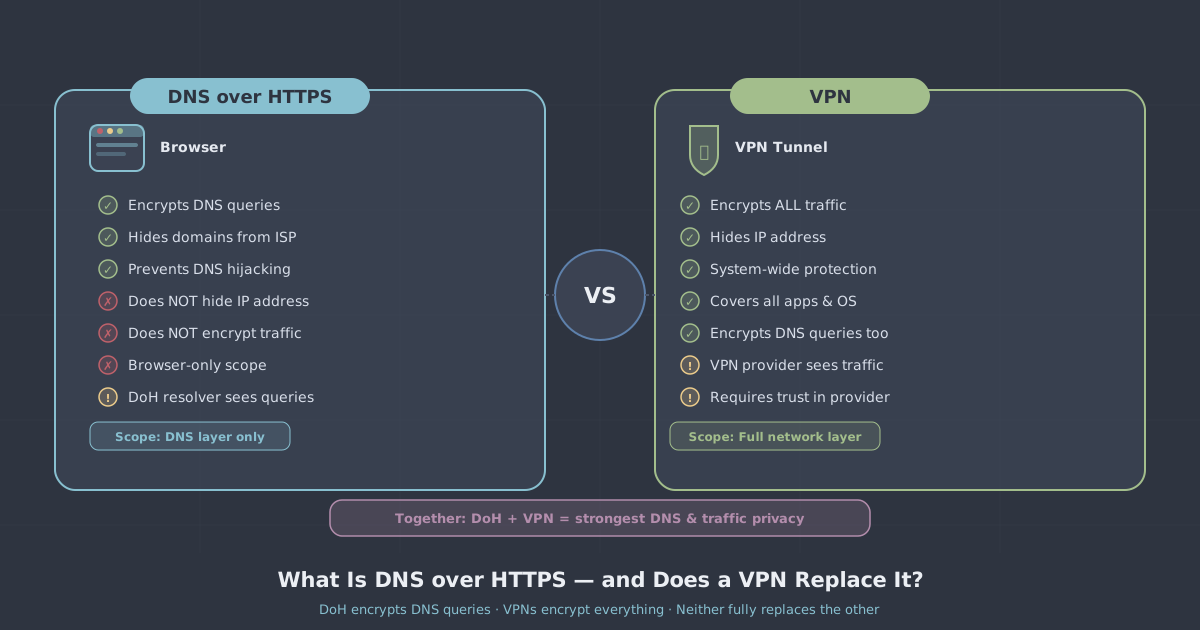
- Your ISP cannot read your DNS queries. The queries travel inside TLS-encrypted HTTPS traffic, indistinguishable from ordinary web browsing at the packet level.
- Network eavesdroppers on public Wi-Fi see nothing useful. The domain names you're looking up are hidden from anyone sniffing the local network.
- DNS tampering is harder. Because the connection is encrypted and authenticated, it's much more difficult for a middle party to forge DNS responses.
Firefox, Chrome, Edge, and Safari all support DoH, and most have it enabled or partially enabled by default. The resolver they typically use is a third-party privacy-focused one rather than your ISP's default.
What DoH Does Not Protect
Here is where people often overestimate DoH. Encrypting the DNS query does not encrypt the actual connection that follows. After your browser resolves example.com, it opens a TCP connection to that IP address. Several things remain visible to your ISP and network even with DoH active:
- Your IP address. Your ISP always knows your IP address—it assigned it to you. Every connection you make is logged at the network level regardless of DoH.
- The destination IP address. Even if the domain name is hidden, the IP address you connect to is visible. In many cases a single IP hosts only one domain, making it trivial to infer the site.
- SNI (Server Name Indication). When your browser initiates a TLS connection, it announces the hostname in the SNI field so the server knows which certificate to present. This is sent in plain text during the TLS handshake unless Encrypted Client Hello (ECH) is also in use—and ECH adoption is still limited.
- Traffic volume and timing. The size and timing of your traffic can reveal a great deal even without readable content.
- All non-browser traffic. DoH only covers the browser's own DNS queries. Other apps on your device—email clients, system services, games—continue to use your system's default DNS resolver, which may not use DoH at all.
DoH also moves trust from your ISP to the DoH resolver. If you're using a browser's default resolver, you are now trusting that company's DNS infrastructure rather than your ISP's. That may or may not be an improvement depending on your threat model.
What a VPN Protects
A VPN works at a lower level than a browser extension or application-layer protocol. When you connect to a VPN, all traffic leaving your device is encrypted and routed through the VPN server before reaching the internet. The practical consequences are quite different from DoH:
- Your ISP sees only encrypted traffic to the VPN server. It cannot read the content, see the destination IP addresses, or observe traffic volume patterns for individual sites.
- Your real IP address is hidden from websites and services. They see the VPN server's IP address instead.
- DNS queries are also protected—without relying on DoH. PremierVPN routes DNS through its own resolver over the encrypted tunnel, so DNS lookups never reach your ISP in plain text.
- All applications are covered. Unlike browser-level DoH, a VPN protects every app on your device: browsers, mail clients, torrenting software, games, system updates, everything.
If you want to understand the broader picture of what a VPN does and does not do, our introduction to VPNs covers the fundamentals clearly.
Where a VPN Has Its Own Gaps
A VPN is not a silver bullet either. It shifts trust from your ISP to the VPN provider—so the provider's no-logs policy matters. A VPN also does not prevent tracking via browser fingerprinting, cookies, or logged-in accounts. And if there is a DNS leak—a misconfiguration where DNS queries escape the tunnel—those queries can reach your ISP even while the VPN is active. You can check for leaks with our IP and DNS leak test.
How DoH and a VPN Interact
When you use a VPN, the VPN client typically overrides your system DNS settings and routes DNS queries through the encrypted tunnel to the VPN's own resolver. This means browser-level DoH settings can conflict or become redundant depending on how the VPN is configured.
In practice, there are three common scenarios:
| Scenario | DNS queries | Traffic |
|---|---|---|
| DoH only (no VPN) | Encrypted to DoH resolver; ISP cannot read them | Unencrypted at network level; destination IPs visible to ISP |
| VPN only (no DoH) | Encrypted inside VPN tunnel to VPN's resolver | Fully encrypted; ISP sees only VPN server |
| VPN + DoH | Usually handled by VPN tunnel; browser DoH may be bypassed or redundant | Fully encrypted; ISP sees only VPN server |
When a VPN is active and correctly configured, DoH in the browser adds little extra protection because the VPN is already handling DNS securely. The more meaningful combination is using a VPN with a verified no-leaks configuration—not layering two DNS encryption methods on top of each other.
Does a VPN Replace DoH?
For most practical purposes, yes—a well-configured VPN makes browser-level DoH redundant for DNS privacy. The VPN encrypts DNS queries at the system level, covers all applications, and hides far more than just domain name lookups.
DoH on its own is a meaningful improvement over nothing, particularly for users who are not using a VPN at all. If your only concern is preventing your ISP from building a list of every domain you visit, and you accept that your IP address and traffic patterns remain visible, then DoH addresses that specific concern at zero cost or configuration effort.
But DoH is not a substitute for a VPN if you want to protect your actual browsing traffic, mask your IP address, cover all your apps, or bypass geographic restrictions. These are categorically different tools.
A Note on Restrictive Networks
In countries with heavy internet filtering—China, Iran, Russia—both standard DoH and standard VPN protocols can be blocked or detected. DoH traffic can be identified and blocked at the firewall level because it always uses specific well-known resolvers on port 443. Standard WireGuard and OpenVPN traffic can also be fingerprinted and throttled.
This is why protocol obfuscation matters in those environments. PremierVPN's PremierVPN X for macOS and Windows uses VLESS+REALITY, a protocol designed to be indistinguishable from ordinary TLS traffic to a legitimate server. For anyone trying to use the internet normally in a heavily censored region, that is a more effective approach than relying on DoH alone. You can read more about how VLESS+REALITY works in our protocol explainer.
Practical Recommendations
Here is what to take away from all of this:
- If you use a VPN consistently: Browser-level DoH is redundant for privacy purposes. You can leave it enabled without harm, but it is not adding meaningful protection on top of what the VPN already provides—provided your VPN has no DNS leaks.
- If you do not use a VPN: Enable DoH in your browser. It hides your DNS queries from your ISP and local network observers, which is genuinely worthwhile. Be aware of what it does not protect.
- If you want full protection for all apps, not just your browser: A VPN is the right tool. DoH only covers the browser's own queries; your mail client, apps, and system processes are not included.
- Check for DNS leaks periodically. Even with a VPN active, a misconfiguration can cause DNS queries to leak outside the tunnel. Use a leak test to confirm your setup is working correctly.
- If you are on a restrictive network: Neither standard DoH nor a conventional VPN may be sufficient. Look for a VPN that supports obfuscated protocols designed for those conditions.
DNS over HTTPS is a genuine step forward for a specific problem. A VPN solves a broader and different set of problems. Understanding the distinction means you can make an informed choice about which one you need—or whether, in certain situations, both have a role to play.