8 min read
It's the question everyone asks before subscribing to a VPN: "Will it slow down my internet?" The honest answer is yes — but probably far less than you expect. We ran extensive speed tests to show you exactly what to expect.
The Quick Answer
On a modern VPN using WireGuard, expect to lose between 5-15% of your base speed when connecting to a server in your own country. International connections naturally have more overhead due to the physical distance data must travel.
Our Test Results
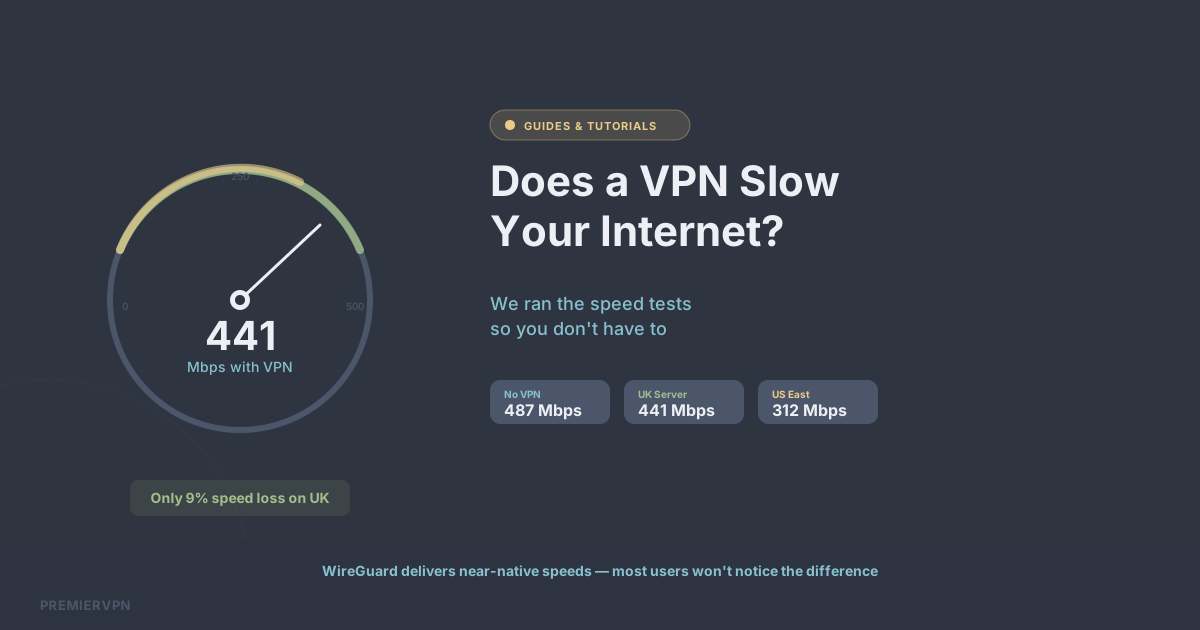
We tested on a 500 Mbps UK fibre connection using PremierVPN's WireGuard servers:
- No VPN: 487 Mbps down / 52 Mbps up
- UK server (WireGuard): 441 Mbps down / 48 Mbps up — 9% speed loss
- Netherlands server: 398 Mbps down / 44 Mbps up — 18% speed loss
- US East Coast server: 312 Mbps down / 38 Mbps up — 36% speed loss
- US West Coast server: 245 Mbps down / 31 Mbps up — 50% speed loss
Why Some VPNs Are Slower Than Others
Three factors determine VPN speed:
1. Protocol choice. WireGuard is dramatically faster than OpenVPN. If you're using a provider that defaults to OpenVPN, switch to WireGuard and you'll likely see an immediate improvement.
2. Server distance. Data takes time to travel. A UK user connecting to a UK server will always be faster than connecting to one in Australia. Choose the nearest server to your location unless you specifically need a different country.
3. Server load. Overcrowded servers mean slower speeds. Budget VPNs with millions of free users crammed onto a handful of servers will always be slower than a premium provider with dedicated infrastructure.
When Speed Loss Doesn't Matter
Here's the thing most speed tests don't tell you: for everyday use, the speed difference is imperceptible. Streaming 4K video requires about 25 Mbps. Video calls need about 5 Mbps. Even on a 100 Mbps connection with a 15% VPN overhead, you still have 85 Mbps — more than enough for anything you'd typically do online.
Tips for Maximum VPN Speed
- Always use WireGuard when possible — it's significantly faster than OpenVPN
- Connect to the nearest server to your physical location
- Use a wired connection rather than Wi-Fi for the best baseline speed
- Choose a provider with dedicated servers rather than virtual ones
- Avoid free VPNs — they're almost always slower and less reliable