7 min read
Most people assume their VPN is either on or off. The app shows a green light, the tunnel is active, traffic is protected. Simple. What that mental model misses is the gap between "connected" and "actively sending data"—and in that gap, tunnels can quietly die without the app noticing fast enough to stop unprotected traffic from leaking out.
This is where keepalive packets come in. They are one of the less glamorous parts of VPN engineering, but they have a direct effect on whether your privacy holds up during ordinary computer use—reading a long article, leaving a download to finish, or stepping away from your desk for ten minutes.
This article explains what keepalives are, how they interact with your kill switch, what happens when they are tuned badly, and how the two main modern protocols—WireGuard and OpenVPN—handle the problem differently.
What a VPN tunnel actually looks like when idle
A VPN tunnel is not a physical pipe that stays open regardless of activity. It is a stateful relationship between your device and a VPN server, maintained through software and, in most cases, tracked by intermediate infrastructure—your router, your ISP's NAT gateway, and any stateful firewalls along the path.
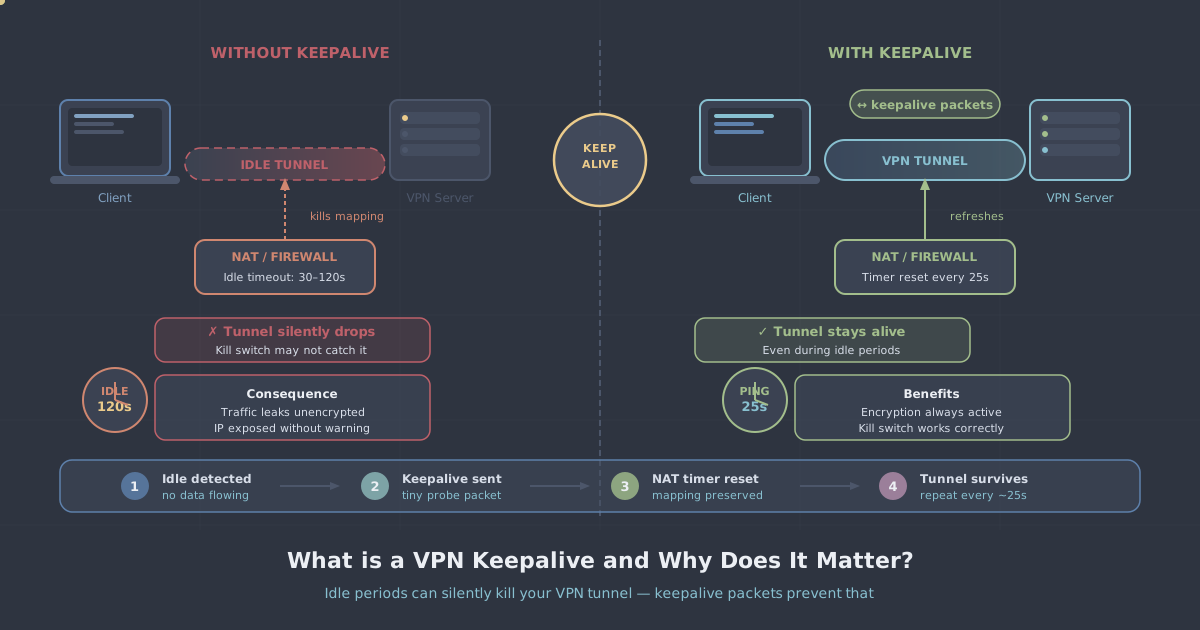
Network address translation (NAT) is particularly relevant here. Your home router almost certainly uses NAT to share a single public IP address among all your devices. To do this, it keeps a table of active connections. Every entry in that table has a timeout. If no packets pass through a given connection within that timeout window, the router deletes the entry. The next packet that arrives has no matching table entry, so it is dropped or misrouted.
From your device's perspective, the VPN app still thinks the tunnel is up. No error has been raised. The connection simply stopped working at the network layer, silently. Depending on how the VPN client detects failure, it could be seconds or minutes before the app realises something is wrong—and during that window, any application that tries to send traffic may do so outside the tunnel.
What keepalive packets do
A keepalive packet is a small, regular transmission sent through the tunnel specifically to prevent this kind of silent expiry. It carries no meaningful payload. Its only job is to pass through the connection often enough to reset the NAT timeout counter and confirm that both ends of the tunnel are still reachable.
The interval matters. Send keepalives too infrequently and NAT entries still expire between them. Send them too frequently and you add unnecessary overhead, drain battery on mobile devices, and add load to the server. Most NAT devices use timeouts somewhere between 25 and 120 seconds for UDP sessions, and between 300 and 900 seconds for TCP sessions—though these values vary significantly between manufacturers and ISPs.
A sensible keepalive interval for a UDP-based VPN tunnel is typically between 15 and 25 seconds. That keeps the NAT entry alive on almost all consumer and enterprise hardware without generating meaningful overhead.
Why this matters for your kill switch
A kill switch blocks all network traffic if the VPN tunnel drops, preventing your real IP address and unencrypted data from reaching the internet. It is an important safety net—but it depends on the VPN client detecting the drop quickly and accurately.
Here is the failure mode that keepalives help prevent. If the NAT entry expires and the tunnel silently stops passing traffic, the VPN client may not immediately register a disconnection. The tunnel endpoint still appears reachable from the client's point of view. No TCP RST packet arrives, no ICMP error, nothing obvious. The client sits in an ambiguous state where it believes it is connected but traffic is not actually flowing through the tunnel.
In that window, the kill switch has not fired because, as far as the client's connection-monitoring code is concerned, the tunnel has not dropped—it is just idle. If an application now sends traffic, the operating system will attempt to route it. Depending on the implementation of the kill switch, this traffic may or may not be blocked. Some kill switch implementations are route-based and will still catch this. Others rely on detecting an active tunnel interface, which may still appear active.
Keepalives close this window by ensuring that the silence never lasts long enough for NAT entries to expire in the first place. The tunnel stays genuinely alive, not just apparently alive.
How WireGuard and OpenVPN approach keepalives differently
WireGuard
WireGuard is stateless by design. A WireGuard interface does not maintain a persistent session in the way OpenVPN does. This is one of the reasons WireGuard reconnects so quickly after a network change—it simply starts sending packets again and the handshake re-establishes automatically.
The trade-off is that WireGuard, by default, sends no keepalive traffic. If your device sits idle behind NAT, the NAT entry will eventually expire, and incoming packets from the server will be unable to reach your device until a new outbound packet triggers a fresh entry.
WireGuard addresses this with a configuration option called PersistentKeepalive. When set, it tells the WireGuard interface to send a keepalive packet at the specified interval, in seconds. The WireGuard documentation recommends a value of 25 seconds as a sensible default for NAT traversal:
[Peer]
PublicKey = ...
Endpoint = vpn.example.com:51820
AllowedIPs = 0.0.0.0/0, ::/0
PersistentKeepalive = 25
This is not enabled by default because it is unnecessary in many configurations—particularly server-to-server tunnels where NAT is not a factor. For end-user VPN clients behind typical home or mobile internet connections, it should be enabled.
OpenVPN
OpenVPN has a built-in keepalive directive that sends ping packets through the tunnel and monitors the response. The configuration takes two values: the ping interval and the ping restart timeout.
keepalive 10 60This tells OpenVPN to send a ping every 10 seconds and to restart the connection if no response has been received for 60 seconds. OpenVPN's keepalive mechanism is more active than WireGuard's—it actively monitors the tunnel's health and will trigger a reconnect if the tunnel has gone dead, which in turn triggers the kill switch to block traffic while reconnection happens.
The behaviour is more verbose but the failure detection is more explicit. The trade-off is slightly higher baseline overhead compared to WireGuard's minimal keepalive packets.
Mobile connections and why they are more vulnerable
Idle tunnel drops are more common on mobile networks than on fixed broadband, for two reasons. First, mobile carriers use aggressive NAT timeouts to conserve resources across large numbers of simultaneous connections. Some carriers apply UDP timeouts as short as 15 to 30 seconds. Second, mobile devices frequently switch between network conditions—4G to Wi-Fi, one cell tower to another—which can interrupt the path through which keepalives are travelling.
If your VPN app does not handle these transitions gracefully, the tunnel can drop silently mid-session. WireGuard's fast re-handshake makes it particularly well suited to mobile use, but PersistentKeepalive still needs to be set appropriately to keep NAT entries alive between handshakes.
PremierVPN's iOS app and Android app use WireGuard as the default protocol with keepalive settings configured for typical mobile network conditions, so this is handled without any manual configuration on your part.
What poorly tuned keepalives look like in practice
The symptoms of incorrect or missing keepalive configuration are easy to misread. You might notice:
- Websites that stop loading after a period of inactivity, then suddenly work again when you click something
- Downloads that stall partway through on slow connections
- SSH sessions that freeze and require reconnection
- Streaming that buffers unexpectedly during quiet scenes (when the video player pauses buffering)
- A VPN app that shows "connected" but produces no actual traffic until something forces a reconnect
These are all consistent with the NAT entry having expired and the tunnel entering the ambiguous state described earlier. In most cases, the first outbound packet you send after the pause will trigger a NAT entry refresh and things will start working again—but for the brief period between that packet leaving your device and the tunnel re-establishing properly, your traffic may be unprotected or simply dropped, depending on your kill switch implementation.
How PremierVPN handles keepalives
PremierVPN uses WireGuard as the default protocol across all platforms, with PersistentKeepalive set to a value appropriate for consumer NAT environments. You do not need to edit configuration files or think about this setting—it is handled correctly in the client.
For users on restrictive networks, PremierVPN X for macOS and PremierVPN X for Windows use the VLESS+REALITY protocol, which is designed to traverse deep packet inspection rather than just NAT—a different problem, but one where session continuity is equally important. You can read more about how that protocol works in our VLESS+REALITY overview.
For OpenVPN users connecting via manual configuration, keepalive directives are included in the configuration files provided. The default settings follow the 10/60 pattern described above, which provides a reasonable balance between responsiveness and overhead.
If you want to verify that your tunnel is genuinely passing traffic and not in an ambiguous connected-but-idle state, our IP leak test will confirm whether your traffic is actually exiting through the VPN server rather than your ISP's network.
Summary
Keepalive packets are a small but consequential part of how a VPN maintains a reliable tunnel. Without them, NAT entries expire, tunnels enter silent failure states, and the window between an undetected drop and a kill switch firing becomes a real exposure risk—not a theoretical one.
The practical takeaway is straightforward. If you are using PremierVPN's apps, keepalives are configured correctly by default and you do not need to do anything. If you are setting up a manual WireGuard connection, add PersistentKeepalive = 25 to the peer section of your configuration. If you are on OpenVPN, confirm that the configuration file includes a keepalive directive. These are small details, but they are the difference between a tunnel that holds up under real-world conditions and one that only works reliably when you are actively generating traffic.