9 min read
If you have ever read anything about VPNs, you have almost certainly come across the word tunnel. It is one of those terms that gets repeated so often it starts to feel self-explanatory — as though picturing a tunnel is enough to understand what is actually happening. It is not, quite. The metaphor is useful up to a point, but it skips over some important technical realities.
This article explains what a VPN tunnel actually is, how it works at a practical level, and what it does and does not protect you from. No prior networking knowledge is assumed. If you want to understand the thing you are trusting with your traffic, this is a good place to start.
The tunnel metaphor — what it gets right
The word tunnel is used to suggest that your internet traffic travels through a private, enclosed channel rather than across the open internet. That intuition is broadly correct. Without a VPN, your data travels in a way that is visible to your internet service provider, the operators of any network you are using, and anyone else positioned between you and the server you are communicating with. A VPN changes that.
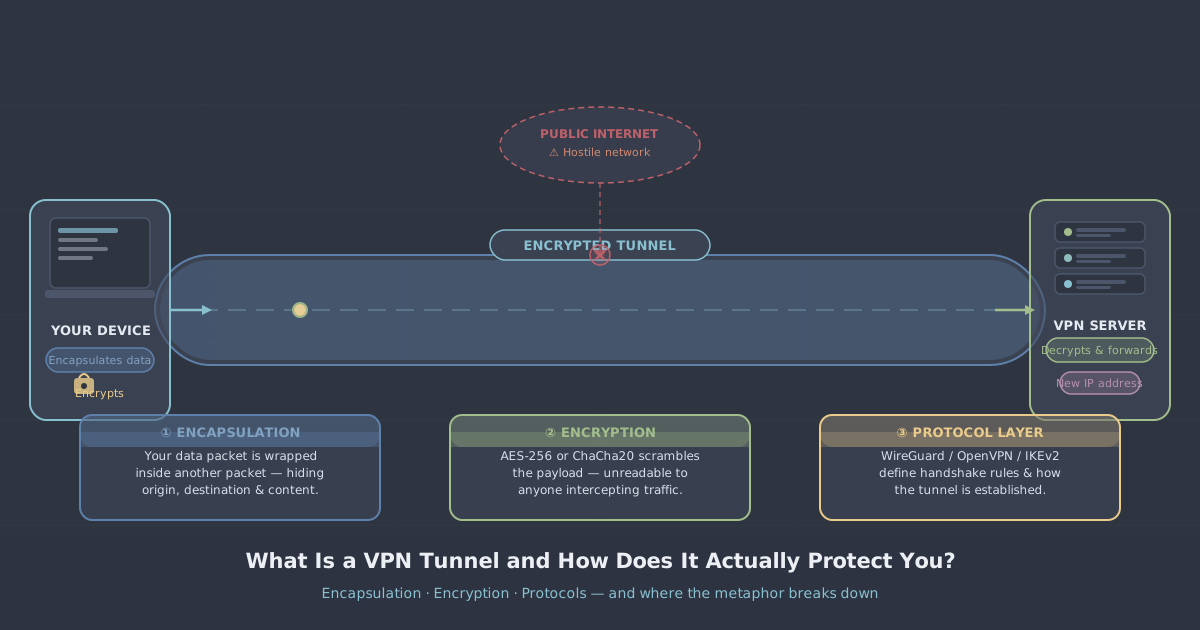
When a VPN is active, your device establishes a connection to a VPN server, and all of your traffic is routed through that connection before reaching its destination. From the outside, observers see traffic flowing between your device and the VPN server — not between your device and, say, a website you are visiting. The contents of that traffic are encrypted, so even what they can observe tells them very little.
So far, the tunnel image holds. You are, in a meaningful sense, moving through a private passage rather than walking exposed across a public space. The problem is that the metaphor implies a kind of physical separation that does not actually exist. Your data is still travelling across the same public internet infrastructure. What makes it private is not isolation but transformation.
What actually happens: encapsulation
The technical mechanism that creates a VPN tunnel is called encapsulation. To understand it, it helps to know that internet data travels in discrete chunks called packets. Each packet contains a header — addressing information that tells the network where it is going — and a payload, which is the actual data.
When a VPN is active, your device takes each outgoing packet and wraps it inside a new packet. The inner packet — your original data, including its destination — is encrypted and becomes the payload of the outer packet. The outer packet has a new header, addressed to the VPN server rather than to your actual destination. This is encapsulation.
The process works like this:
- Your device prepares a packet destined for, say, a website.
- The VPN client encrypts that packet entirely — headers and payload alike.
- The encrypted packet is wrapped inside a new outer packet addressed to the VPN server.
- That outer packet travels across the internet in the normal way.
- The VPN server receives it, strips the outer packet, decrypts the inner one, and forwards the original request to its actual destination.
- Responses follow the same path in reverse.
To anyone watching the traffic in transit — your ISP, a network administrator, a hostile actor on the same Wi-Fi network — all they see is encrypted data going to the VPN server. The original destination, the content of the request, and the nature of what you are doing are hidden.
The role of encryption
Encapsulation alone would not protect you. If the inner packet were wrapped but not encrypted, anyone who intercepted the outer packet and removed its wrapper would see your original traffic. Encryption is what makes the inner packet unintelligible to anyone who does not hold the correct key.
The specific encryption used depends on the VPN protocol. PremierVPN uses WireGuard by default, which encrypts traffic using ChaCha20 for symmetric encryption, Poly1305 for authentication, and Curve25519 for key exchange. These are modern, well-audited algorithms. OpenVPN, also supported, typically uses AES-256-GCM with TLS for the control channel.
In practical terms, current VPN encryption is not realistically breakable by brute force. The protection it provides is genuine, not theoretical.
Where the tunnel metaphor misleads you
The image of a tunnel implies that once you are inside it, you are completely safe. That is not quite right, for a few reasons worth understanding.
The tunnel ends at the VPN server
Your traffic is encrypted and encapsulated between your device and the VPN server. After the VPN server decrypts and forwards your request, it travels onward to its destination in the normal way — and that onward leg is not encrypted by the VPN. If you are visiting a website over plain HTTP, that final leg is readable. The practical answer here is that almost all websites now use HTTPS, which provides its own layer of encryption for that final leg. But it is worth knowing where the VPN's protection ends.
A tunnel does not make you anonymous
A VPN hides your traffic from your ISP and local network observers, and it replaces your IP address with the VPN server's IP address as seen by the websites you visit. That is meaningful. But it does not make you anonymous in a broader sense. Websites can still identify you through browser fingerprinting, cookies, and login sessions. A VPN conceals your network identity; it does not conceal your behaviour on the sites you visit.
The tunnel's integrity depends on the provider
The VPN server at the other end of the tunnel can, in principle, see your decrypted traffic before it forwards it onward. This is why the trustworthiness and no-logs policy of a VPN provider matters. The encryption protects you from third parties; it does not protect you from a provider that logs and sells your activity. PremierVPN operates a strict no-logs policy precisely because the server-side position carries responsibility.
How the protocol shapes the tunnel
Not all VPN tunnels are built the same way. The protocol determines how the tunnel is established, how keys are exchanged, how packets are encapsulated, and how connections are maintained. Different protocols make different trade-offs between speed, security, and reliability.
| Protocol | Encapsulation | Typical use case |
|---|---|---|
| WireGuard | UDP, lightweight header | General use — fast and modern |
| WireGuard Stealth | Obfuscated UDP | Networks that block VPN traffic |
| OpenVPN | UDP or TCP, TLS-based | Compatibility and reliability |
| VLESS + REALITY | Proxied over TLS | Heavily censored networks |
WireGuard's lightweight design means less overhead per packet, which is one reason it tends to be faster than older protocols. VLESS + REALITY, available through PremierVPN X, is designed specifically for environments like China or Iran where deep packet inspection is used to identify and block conventional VPN traffic. You can read more about that approach in our VLESS + REALITY protocol guide.
What a kill switch adds to the picture
One practical weakness of the tunnel model is what happens if the VPN connection drops unexpectedly. If your device continues sending traffic while the tunnel is down, that traffic goes out unencrypted and unencapsulated — exposed in exactly the way a VPN is supposed to prevent.
A kill switch addresses this by cutting off your device's internet connection entirely if the VPN connection is lost. No tunnel means no traffic at all, rather than unprotected traffic. PremierVPN's apps include a kill switch for this reason. It is not a comfort feature — it closes a real gap in the tunnel model.
A note on DNS
Even when a VPN tunnel is active, there is one area where leaks can occur if the software is poorly implemented: DNS. When you type a web address, your device sends a DNS query to translate that address into an IP address. If those queries are sent outside the VPN tunnel — to your ISP's DNS servers rather than through the VPN — your ISP can still see which domains you are looking up, even if they cannot see the content of your traffic.
This is known as a DNS leak. PremierVPN routes DNS queries through the tunnel. You can verify this yourself using our IP and DNS leak test tool.
Putting it together
A VPN tunnel is best understood as two things working together: encapsulation, which wraps your traffic inside new packets addressed to the VPN server, and encryption, which makes the contents of those packets unreadable in transit. The result is that your ISP sees only that you are connected to a VPN server, local network observers see nothing useful, and websites see the VPN server's IP address rather than your own.
The metaphor of a tunnel captures the sense of a private passage through a public space, but it can create a false impression of total protection. The tunnel ends at the VPN server. It does not remove cookies, browser fingerprints, or login sessions. And it is only as trustworthy as the provider operating the server at the other end.
Understanding these limits is not a reason to distrust VPNs — it is a reason to use them intelligently. If you want to see how this works in practice, the what is a VPN guide covers the broader picture, and our apps for Windows, macOS, iOS, and Android all implement the tunnelling mechanisms described here with WireGuard as the default protocol.