9 min read
Most people who use a VPN assume their real IP address is hidden the moment they connect. For IPv4 traffic, that assumption is usually correct. But there is a second IP addressing system in widespread use—IPv6—and if your VPN does not handle it properly, your real address can be visible to every website and service you visit, regardless of whether your VPN tunnel appears to be working normally.
This is not a theoretical edge case. IPv6 adoption has grown steadily over the past decade, and internet service providers across the UK, Europe, and North America now assign IPv6 addresses to a significant proportion of their customers. If your ISP gives you an IPv6 address and your VPN ignores that traffic, you have a leak.
This article explains what IPv6 leaking actually is, why it happens, how to detect it, and what you can do to prevent it—including how PremierVPN handles the problem.
IPv4 and IPv6: A Quick Primer
The internet runs on IP addresses—unique identifiers that allow devices to send and receive data. IPv4, the original system, uses 32-bit addresses written in the familiar dotted format: 203.0.113.45. The problem is that IPv4 can only accommodate roughly 4.3 billion unique addresses, and the internet ran out of them years ago.
IPv6 was designed to fix this. It uses 128-bit addresses, written in hexadecimal blocks separated by colons: 2001:0db8:85a3:0000:0000:8a2e:0370:7334. The address space is effectively inexhaustible. Every device can have a globally unique IPv6 address without the workarounds that IPv4 requires.
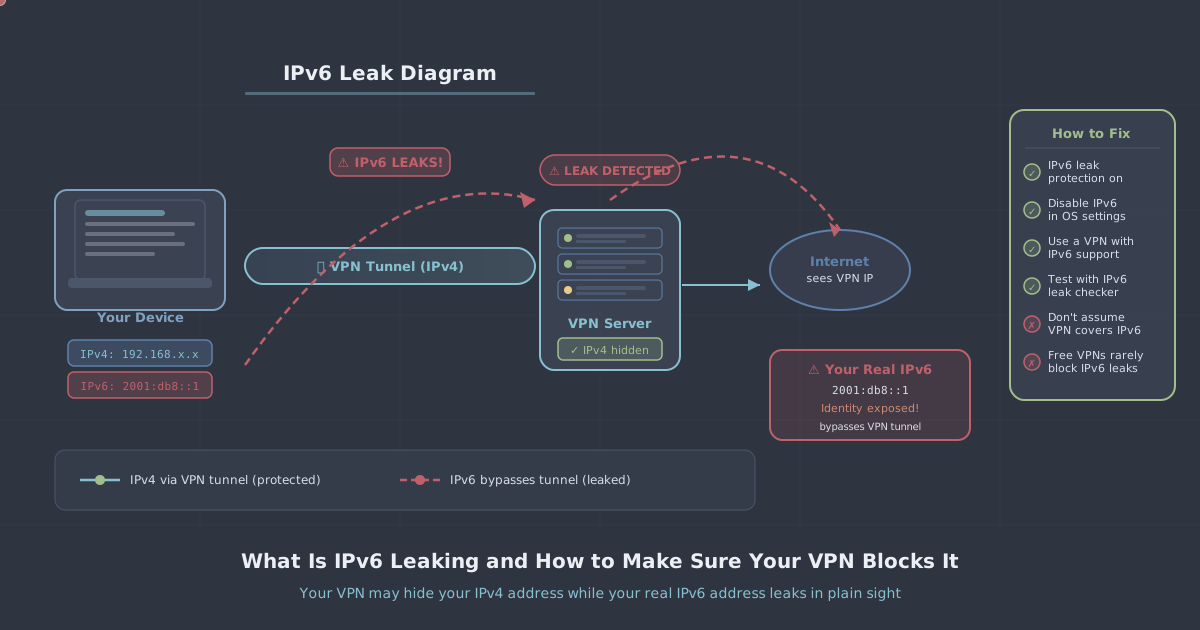
The practical consequence for VPN users is that your device may have two IP addresses simultaneously—one IPv4 and one IPv6—and traffic can flow over either. A VPN that only tunnels IPv4 traffic will leave IPv6 traffic travelling directly through your ISP's connection, completely outside the encrypted tunnel.
How an IPv6 Leak Actually Happens
When you connect to a VPN, the software typically redirects your IPv4 traffic through an encrypted tunnel to a VPN server, which then forwards requests to the wider internet. Websites see the VPN server's IP address, not yours.
IPv6 leaks occur in two main ways:
- IPv6 is simply not tunnelled. The VPN only establishes a tunnel for IPv4. Your operating system continues to send IPv6 traffic through the regular network interface, bypassing the VPN entirely. Websites that support IPv6 receive requests directly from your ISP-assigned IPv6 address.
- IPv6 is not blocked at the firewall level. Some VPN implementations attempt to tunnel IPv6 but do not apply firewall rules to prevent IPv6 traffic from escaping if the tunnel drops or is not yet established. This can cause brief exposure during connection and reconnection.
What makes this particularly hard to notice is that everything looks normal from the user's perspective. The VPN icon shows connected. Your IPv4 address shows the VPN server's location. But if you visit a site that logs both IPv4 and IPv6 connections, your real IPv6 address is sitting there in their access log.
Who Is Actually Affected
Not every user is at risk. If your ISP does not assign you an IPv6 address, you cannot leak an IPv6 address. To check whether you have one, you can open a terminal and run:
# On macOS or Linux
ifconfig | grep inet6

# On Windows
ipconfig | findstr IPv6
If you see a global unicast address (one that starts with 2 or 3, rather than fe80 which is a link-local address used only on your local network), your device has a publicly routable IPv6 address. At that point, whether you leak depends entirely on how your VPN handles IPv6.
UK ISPs including BT, Sky, and Virgin Media have rolled out IPv6 to varying degrees. If you are on a relatively modern broadband connection, there is a reasonable chance you have IPv6 connectivity, even if you have never thought about it.
How to Test for an IPv6 Leak
Testing is straightforward. The process is:
- Disconnect from your VPN completely.
- Visit an IP leak test tool and note both your IPv4 and IPv6 addresses. PremierVPN provides its own test at ip-leak-test.
- Connect to your VPN.
- Reload the test page and check the results again.
If the IPv6 address shown after connecting to the VPN matches the one you noted before connecting, you have a leak. If no IPv6 address appears after connecting—either because the VPN blocks it or because your ISP does not assign one—you are not leaking.
A VPN with proper IPv6 handling should either route your IPv6 traffic through its tunnel (showing a different IPv6 address after connecting) or block IPv6 entirely so no IPv6 address is visible to external sites.
The Two Legitimate Solutions
Tunnelling IPv6 Traffic
The more complete solution is for the VPN to tunnel IPv6 traffic alongside IPv4, replacing your real IPv6 address with one associated with the VPN server. This means you retain IPv6 connectivity—useful for sites that are IPv6-only or that serve different content over IPv6—while your real address remains hidden.
This requires the VPN provider to operate IPv6-capable servers and configure their routing correctly. It is the better option technically, but it adds infrastructure complexity for the provider.
Blocking IPv6 at the Firewall Level
The simpler and more commonly implemented solution is to use firewall rules to block all IPv6 traffic when the VPN is active. Your device will fall back to IPv4 for everything, which the VPN tunnels normally. Sites that only offer IPv6 will become unreachable, but in practice this affects very few destinations that are not also available over IPv4.
The important detail here is when the block is applied. It must be in place before any traffic flows—including during the initial connection handshake and during any reconnection after a dropped tunnel. A VPN that only blocks IPv6 once the tunnel is fully established can still leak briefly at the margins.
How PremierVPN Handles IPv6
PremierVPN applies firewall-level IPv6 blocking as part of its connection process. When you connect using the Windows app, macOS app, or any of the mobile clients, IPv6 traffic is blocked so that it cannot exit through your physical network interface. Your real IPv6 address is not exposed to sites you visit.
This blocking works in conjunction with the kill switch functionality, which prevents any traffic—IPv4 or IPv6—from leaving your device outside the tunnel if the connection drops unexpectedly. The two features together close the main scenarios under which IP addresses can be exposed.
PremierVPN uses WireGuard as its default protocol, with WireGuard Stealth available for networks that throttle or block standard VPN traffic. For users in highly restrictive environments, PremierVPN X uses VLESS+REALITY, a protocol specifically designed to resist deep packet inspection. You can read more about that approach in our VLESS+REALITY protocol guide.
If you want to verify that protection is working on your own connection, the PremierVPN IP leak test checks for both IPv4 and IPv6 exposure and will show you what external sites actually see when you are connected.
Other Steps You Can Take
If you want belt-and-braces protection beyond what the VPN app provides, there are a few additional measures worth knowing about.
Disable IPv6 at the Operating System Level
You can instruct your operating system not to use IPv6 at all. This removes any possibility of an IPv6 leak, regardless of VPN behaviour. The tradeoff is that you will not have IPv6 connectivity at all, but for most day-to-day browsing and streaming this is imperceptible.
On Windows, you can disable IPv6 per network adapter through the adapter's properties, or system-wide via the registry. On macOS, you can set IPv6 to Link-local only for each network interface in System Settings under Network. On Linux, the method depends on your distribution and network manager.
Check Router Settings
If you run a VPN at the router level rather than on individual devices, make sure the router firmware either tunnels or blocks IPv6. Consumer routers with third-party firmware (OpenWrt, for example) give you the granular control needed to do this reliably. Stock firmware varies considerably in how it handles IPv6 when a VPN is active.
Use the Browser Extension
For browser-based activity specifically, the PremierVPN Protect browser extension provides an additional layer of WebRTC leak protection. WebRTC is a separate mechanism through which browsers can expose local IP addresses, and it operates independently of your system's firewall rules—making it worth addressing on its own.
Summary
IPv6 leaking is a genuine privacy gap that catches many VPN users off guard because everything appears to be working normally while it is happening. The root cause is simple: if a VPN only handles IPv4 traffic, your IPv6 address travels outside the tunnel and is visible to any site that supports IPv6 connections.
The practical steps are equally straightforward. Test your current setup using the IP leak test to establish whether you are affected. If you are, ensure your VPN applies firewall-level IPv6 blocking—not just during stable connection, but throughout the connection lifecycle including reconnection. PremierVPN does this by default across all its apps. If you want additional certainty, disabling IPv6 at the OS level eliminates the attack surface entirely at the cost of IPv6 connectivity, which most users will not notice in practice.
Privacy tools only work if the protection is actually complete. IPv6 is one of the less obvious gaps, but it is also one of the easier ones to close once you know it exists.