9 min read
Encryption is the reason a VPN is a VPN and not just a proxy. It is what separates a tunnel that genuinely protects your traffic from one that simply reroutes it. Yet most people who use a VPN daily would struggle to explain what encryption is actually doing—and that gap matters, because understanding the mechanics helps you make better decisions about how and when to trust a VPN.
This article explains how VPN encryption works in plain English. We will cover the core algorithms you will see mentioned in VPN documentation, how a secure connection is actually established, and what realistic threats to encryption look like. No maths degree required, though we will not shy away from the technical details that actually count.
What encryption is doing to your data
At its simplest, encryption is a transformation. You feed in readable data—a DNS query, an HTTP request, a login credential—and a cipher scrambles it into ciphertext that looks like random noise to anyone who intercepts it. Only a party holding the correct key can reverse the transformation and recover the original data.
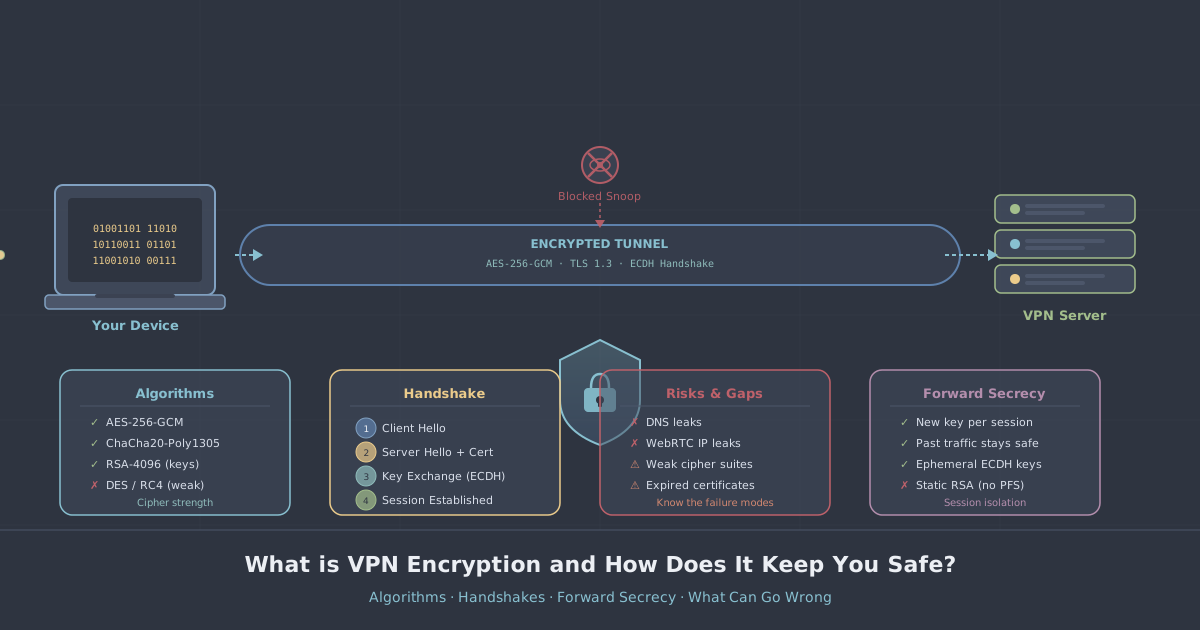
In a VPN context, every packet leaving your device is encrypted before it leaves. Your ISP sees ciphertext. The Wi-Fi operator at a café sees ciphertext. Anyone running a packet capture on the same network sees ciphertext. The only entity that decrypts your traffic is the VPN server you are connected to, using the session key your device and that server negotiated when you connected.
There are two broad categories of cipher that VPN systems use, and they play different roles.
- Symmetric ciphers use the same key to encrypt and decrypt. They are fast and efficient, which makes them suitable for encrypting the bulk of your traffic in real time.
- Asymmetric (public-key) ciphers use a mathematically linked key pair—a public key to encrypt, a private key to decrypt. They are computationally expensive but solve a critical problem: how do two strangers on the internet agree on a shared secret without an eavesdropper learning what it is?
A VPN uses both, in sequence. Asymmetric cryptography handles the handshake and key exchange at the start of a session. Symmetric cryptography encrypts everything after that.
AES-256: the symmetric workhorse
When VPN documentation mentions AES-256, it is referring to the Advanced Encryption Standard with a 256-bit key. AES operates on fixed blocks of data (128 bits at a time) and runs each block through multiple rounds of substitution, permutation, and mixing operations, all keyed to your session key.
The "256" in AES-256 refers to key length. A 256-bit key means there are 2256 possible keys—a number so large it is practically meaningless to try to enumerate them. For context, estimates of the number of atoms in the observable universe run to roughly 1080, while 2256 is approximately 1077. Brute-forcing AES-256 with current or foreseeable classical computers is not a realistic attack.
AES is not just theoretically sound—it is implemented in hardware on virtually every modern CPU via AES-NI instructions, which means encryption and decryption happen at near line-speed with negligible CPU overhead. This is part of why AES-256 has become the standard choice for VPN data-channel encryption.
Cipher modes matter too
AES on its own is a block cipher—it encrypts one fixed-size block at a time. How those blocks are chained together is determined by the mode of operation. The most relevant modes in VPN use are:
- AES-256-GCM (Galois/Counter Mode)—the current best practice. GCM is an authenticated encryption mode, meaning it both encrypts your data and produces an authentication tag that detects any tampering. It also parallelises well, so it is fast. WireGuard does not use AES-GCM directly (more on that below), but OpenVPN in its modern configurations does.
- AES-256-CBC (Cipher Block Chaining)—an older mode still seen in legacy OpenVPN configurations. CBC is not authenticated on its own, so it is typically paired with a separate HMAC to detect tampering. Functional, but GCM is preferable.
ChaCha20-Poly1305: WireGuard's cipher
WireGuard, the modern protocol used by default in PremierVPN's apps, does not use AES. Instead it uses ChaCha20-Poly1305—a cipher suite combining the ChaCha20 stream cipher with the Poly1305 message authentication code.
ChaCha20 was designed specifically to be fast in software, without requiring hardware acceleration. On devices where AES-NI is absent or slow—older Android phones, budget routers, certain ARM processors—ChaCha20 is considerably faster than AES-GCM and equally secure. On modern x86 hardware with AES-NI, the two are roughly comparable in performance.
The Poly1305 component provides the same authentication guarantee as the "G" in GCM: any modification to the ciphertext in transit will be detected and the packet discarded. Authenticated encryption is not optional for a serious VPN—without it, an attacker who cannot read your traffic might still be able to manipulate it in controlled ways.
The handshake: how a session key is agreed
Here is the part most explanations skip. Even the best symmetric cipher is useless if the key used to encrypt your session is leaked during the process of setting it up. This is the problem the handshake solves.
When your VPN app connects to a server, the two sides need to agree on a shared session key. They cannot simply send the key over the network—that would expose it to eavesdroppers. Instead, they use a key exchange protocol.
Diffie-Hellman key exchange
The classic solution is Diffie-Hellman (DH) key exchange, or its elliptic-curve variant (ECDH). The intuition is elegant: both sides generate a random private value, exchange public values derived from those private values, and each independently computes the same shared secret—without that secret ever appearing on the wire. An eavesdropper who captures the public values cannot feasibly work backwards to the shared secret.
OpenVPN uses TLS for its handshake, which in modern configurations relies on ECDH for key exchange. WireGuard uses a purpose-built handshake based on the Noise protocol framework, using Curve25519 for its key exchange. Curve25519 is an elliptic-curve function designed for high security and resistance to implementation errors.
Forward secrecy
A related concept worth understanding is perfect forward secrecy (PFS). With PFS, each session uses a freshly generated key pair for the key exchange. The consequence is that if an attacker records your encrypted traffic today and later manages to compromise the server's long-term private key, they still cannot decrypt your past sessions—because each session's key was ephemeral and has since been discarded.
Both WireGuard and modern OpenVPN configurations provide forward secrecy. WireGuard in fact rotates session keys every few minutes within a connection, limiting the window of exposure further.
Authentication: making sure you're talking to the right server
Encryption without authentication is incomplete. If your VPN app encrypts your traffic but cannot verify it is talking to the genuine VPN server—rather than an impostor—an attacker could intercept the connection and establish separate encrypted sessions with each side, reading everything in the middle. This is a man-in-the-middle (MITM) attack.
VPN protocols address this through server authentication. OpenVPN uses TLS certificates: the server presents a certificate signed by a trusted certificate authority (or a pinned CA specific to the VPN provider), and the client verifies it before proceeding. WireGuard uses static public keys: each server and client has a long-term Curve25519 public key that is pinned in the configuration. Your app will only complete a handshake with a server whose public key matches what is baked into your configuration.
This is one reason it is important to download VPN apps from the official source and use configuration files or credentials provided directly by your VPN provider. A tampered app or configuration could substitute a different public key and leave you vulnerable.
What actually breaks VPN encryption in practice
The mathematics of AES-256 or ChaCha20 is not where connections are typically compromised. The realistic attack surface looks quite different.
- DNS leaks. If your DNS queries are resolved outside the VPN tunnel—falling back to your ISP's DNS resolver—an observer can infer a great deal about your activity without breaking any encryption at all. You can check your exposure using our IP and DNS leak test.
- IPv6 leaks. Many VPN implementations tunnel IPv4 traffic but leave IPv6 traffic unprotected. If your device has an IPv6 address and connects to a dual-stack site, your real IP may be exposed.
- Kill switch failures. If the VPN connection drops briefly and there is no kill switch to block unencrypted traffic, your real IP and unencrypted data can leak during the gap.
- Endpoint compromise. Encryption protects data in transit. It does not protect data that has already been decrypted at its destination. If the device you are using is compromised by malware, the attacker can read your data before it enters the tunnel or after it leaves.
- Weak protocol configuration. Using an outdated cipher suite, disabling certificate verification, or running a protocol version with known vulnerabilities undermines the cryptography regardless of the underlying algorithm's theoretical strength.
- Harvest now, decrypt later. Some threat actors record large volumes of encrypted traffic with the intention of decrypting it once quantum computing matures sufficiently. This is a long-term concern rather than an immediate one for most people, but it is the reason post-quantum cryptography is an active research area.
How PremierVPN approaches encryption
PremierVPN uses WireGuard as the default protocol across all its apps—Windows, macOS, iOS, and Android—which means ChaCha20-Poly1305 for data encryption and Curve25519 for key exchange, with forward secrecy built in. For networks where WireGuard traffic is detected and blocked, WireGuard Stealth and OpenVPN are available as fallback options.
For users in environments with deep packet inspection—such as those covered in our guides on VPN use in China—PremierVPN X implements the VLESS+REALITY protocol, which is designed to be indistinguishable from normal HTTPS traffic at the network level. You can read more about that approach on the VLESS+REALITY protocol page.
PremierVPN operates a strict no-logs policy, which matters alongside encryption: if no session data is retained, there is nothing for a third party to obtain even if they compel the provider legally.
The short version
VPN encryption works in two phases. The handshake—using asymmetric cryptography and key exchange—establishes a shared session key without exposing it to eavesdroppers, and authenticates the server so you know you are talking to the right endpoint. The data channel—using a fast, authenticated symmetric cipher like AES-256-GCM or ChaCha20-Poly1305—encrypts every packet of your actual traffic.
The algorithms in widespread use today are not the weak point. DNS leaks, kill switch gaps, misconfigured clients, and compromised endpoints are where real-world failures occur. Understanding the mechanics puts you in a better position to spot those gaps and close them—which is ultimately the point of using a VPN in the first place.