7 min read
VPN on Starlink: What You Need to Know Before You Start
Starlink has changed the game for rural and remote internet access. Decent speeds, low latency by satellite standards, and availability in places where fibre or cable will never reach — it is genuinely impressive kit. But it does have some quirks that affect how a VPN behaves on it, and knowing about them before you start will save you a lot of head-scratching.
This guide walks you through those quirks, explains which VPN protocols work best on Starlink, and shows you how to get PremierVPN running well on your Starlink connection — whether you are at home, in a vehicle, at a remote work site, or travelling.
How Starlink Handles Your IP Address
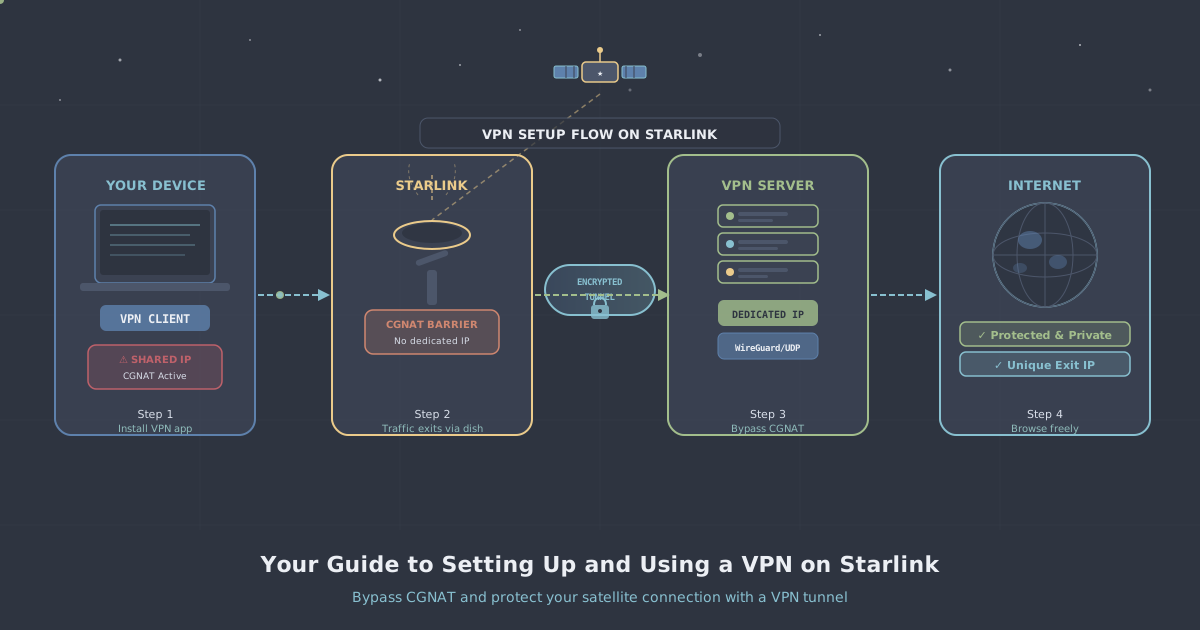
Unlike a standard home broadband connection, Starlink puts most residential subscribers behind Carrier-Grade NAT (CGNAT). This means you share a public IP address with many other Starlink users, and you do not get a routable public IP of your own.
CGNAT has two practical consequences for VPN users:
- You cannot host anything at home. Running a game server, a remote desktop, or any service that needs incoming connections will not work without additional steps.
- Some VPN configurations that rely on incoming connections will fail. Peer-to-peer or self-hosted VPN setups that need port-forwarding on your router are blocked by CGNAT before they even reach your dish.
A managed VPN service like PremierVPN routes your traffic outbound to its own servers, which means CGNAT is not a problem for the VPN connection itself. The VPN client on your device initiates the connection; no inbound ports are needed.
Does a VPN Slow Down Starlink?
Any VPN adds some overhead — that is simply physics. Encryption and routing through an additional server will add a few milliseconds of latency and modest CPU load. On Starlink, the base latency is already higher than a wired connection (typically 25–60 ms under normal conditions), so adding a VPN on top of that is worth thinking about.
In practice, the impact depends heavily on which protocol you use and which server you connect to. Choose a nearby server and a modern protocol, and most people find the real-world difference unremarkable for everyday tasks including streaming and video calls. Gaming is more sensitive, and we cover that specifically below.
Best VPN Protocols for Starlink
Protocol choice matters more on Starlink than on a wired connection. Here is a quick comparison:
| Protocol | Speed | Latency impact | Best for |
|---|---|---|---|
| WireGuard | Excellent | Low | General use, gaming, streaming |
| OpenVPN (UDP) | Good | Moderate | General use, compatibility |
| OpenVPN (TCP) | Lower | Higher | Restricted networks only |
| VLESS + REALITY | Good | Moderate | Censored regions (China, Iran, Russia) |
WireGuard is the clear first choice for Starlink. It was designed with modern network conditions in mind, uses a lean codebase, and handles the slightly variable latency of a satellite link better than older protocols. PremierVPN supports WireGuard across all its apps.
Setting Up PremierVPN on Starlink
The setup process is the same as on any other internet connection. Starlink does not require any special router configuration on your end for a standard outbound VPN connection.
Step 1: Download the Right App
Install the PremierVPN app for your device:
- PremierVPN for Windows
- PremierVPN for macOS
- PremierVPN for iOS
- PremierVPN for Android
- PremierVPN for Ubuntu / Linux
- PremierVPN for Fire TV
Step 2: Choose WireGuard as Your Protocol
Inside the app, open the protocol settings and select WireGuard. If you are in a country with internet restrictions and WireGuard is being blocked, use PremierVPN X for Windows or PremierVPN X for macOS instead, which uses the VLESS + REALITY protocol designed to bypass deep packet inspection.
Step 3: Connect to a Nearby Server
Pick a server geographically close to you. On a satellite connection, every millisecond counts — routing your traffic halfway around the world adds unnecessary latency on top of what Starlink already introduces. You can browse the full list on the server locations page.
Step 4: Check for Leaks
Once connected, visit our IP leak test to confirm that your real IP address and DNS requests are hidden. On Starlink this is particularly worth doing because the CGNAT shared IP can sometimes cause confusion about what is and is not exposed.
Gaming on Starlink with a VPN
Gaming on Starlink is already workable for most online titles thanks to low-earth-orbit latency figures. Adding a VPN does increase latency slightly, so the approach matters.
- Use WireGuard — it has the lowest overhead of any protocol PremierVPN supports.
- Connect to a server close to the game's regional server, not necessarily close to you geographically. Sometimes this actually reduces the route distance your packets travel.
- Avoid servers that are visibly under heavy load.
If you want a stable, low-jitter connection for competitive gaming, a Dedicated IP gives you a fixed address that is not shared with other users, reducing the risk of being caught in blanket rate-limiting aimed at other traffic on the same IP.
More detail is available on our Gaming VPN page.
Streaming on Starlink with a VPN
Starlink's bandwidth is more than sufficient for HD and 4K streaming. A VPN lets you access content libraries from other regions or maintain access to home-country services when travelling — useful given that Starlink itself is available in many countries.
Select a server in the region whose content you want to access, then open your streaming service as normal. See the Streaming VPN page for more on how this works.
Remote Work on Starlink with a VPN
Starlink is increasingly popular with remote workers in rural areas or people working from mobile offices and boats. A VPN is valuable here for two reasons: it protects traffic over a connection you do not fully control, and it can give you a consistent IP address that corporate firewalls or internal systems can whitelist.
If your employer requires access to specific internal systems, a Dedicated IP is the cleanest solution — you get a fixed address that never changes and is yours alone. For teams rather than individuals, a Business VPN gives centralised management alongside that stability.
Further guidance is on the Remote Work VPN page.
Starlink in Restricted Countries
Starlink has been deployed in or near countries with heavy internet censorship, including situations where humanitarian or relief workers have used it in conflict zones. In countries such as China, Iran, and Russia, standard VPN protocols are actively blocked or throttled by deep packet inspection.
For those situations, PremierVPN X uses the VLESS + REALITY protocol, which is designed to be indistinguishable from ordinary HTTPS traffic. It runs as a separate app:
You can read more about how the protocol works on the VLESS + REALITY explainer page.
Torrenting on Starlink with a VPN
Starlink's terms of service do not permit using the connection for activities that infringe copyright, so only torrent content you are legally entitled to download. That said, a VPN is a sensible layer of privacy for any peer-to-peer activity because your IP address is otherwise visible to every peer in the swarm.
If you are on macOS, TorrentLock is a companion app that binds your torrent client to the VPN tunnel. If the VPN drops, TorrentLock kills the torrent client — your IP is never exposed, even momentarily.
Do You Need a Dedicated IP or Dedicated Server on Starlink?
Most users are well served by a standard shared VPN plan. But there are cases where a dedicated resource makes sense on a Starlink connection:
Dedicated IP
A Dedicated IP gives you a fixed, solo public IP address. This is useful if you need to whitelist an IP with a third-party service, want a consistent identity for gaming, or work with systems that flag shared IP ranges.
Dedicated WireGuard Server
A Dedicated WireGuard Server goes further — the entire server is yours. If you want maximum performance and no shared resources whatsoever, this is the option to consider. Combined with WireGuard with port forwarding, it also solves the CGNAT problem: you get a real, routable public IP with open ports, so you can host services that need inbound connections — something that is impossible on a standard Starlink connection without this.
Common Issues and How to Fix Them
VPN connects but traffic is slow
Switch from OpenVPN to WireGuard if you have not already. Also try a different server — some locations are busier than others. Connecting to the server geographically nearest to you is usually the best starting point.
VPN keeps dropping
Starlink's connection can momentarily drop during handoffs between satellites. WireGuard handles this better than OpenVPN because it re-establishes the tunnel very quickly. Make sure the kill switch in the PremierVPN app is enabled so that if the tunnel drops, your traffic stops rather than leaking.
Cannot access a geo-restricted service
Some streaming services maintain lists of known VPN IP ranges. If one server is blocked, try another server in the same region — PremierVPN rotates and maintains its server infrastructure to minimise this.
Very high latency with VPN active
Check that you are not connected to a server on the other side of the world. Also check that WireGuard is selected rather than OpenVPN TCP, which adds the most latency.
Summary
Starlink is a capable internet connection and a VPN works well on it with the right setup. The key points to remember:
- CGNAT is not a problem for outbound VPN connections — PremierVPN works without any special router configuration.
- Use WireGuard for the best performance on a satellite connection.
- Pick a nearby server to keep latency manageable.
- If you need inbound connections (hosting, gaming servers, remote access), a Dedicated WireGuard Server with port forwarding solves the CGNAT limitation.
- In censored regions, use PremierVPN X with VLESS + REALITY instead of the standard app.
PremierVPN is a UK-based, independently operated, no-logs service. If you are new to VPNs and want more background before diving in, the What is a VPN? guide is a good starting point.