8 min read
Most people using a VPN connect to a single server. Their traffic is encrypted, their IP address is masked, and that is enough for the vast majority of everyday use cases. But there is a configuration that goes a step further: multi-hop VPN, sometimes called double VPN or VPN chaining. It routes your traffic through two separate servers before it reaches the open internet.
The name makes it sound exotic, but the underlying principle is straightforward. This article explains what multi-hop actually does, what it does not do, and the specific situations where the added complexity is worth it. If you are already comfortable with the basics, you can skip ahead to the use-case sections. If you want a grounding in how a single-hop VPN works first, our introduction to VPNs is a good starting point.
How a Standard Single-hop VPN Works
When you connect to a VPN, your device establishes an encrypted tunnel to one VPN server. All your internet traffic travels through that tunnel. From the perspective of your internet service provider, they can see that you are connected to a VPN server—but not what you are doing inside the tunnel. From the perspective of any website or service you visit, they see the VPN server's IP address rather than yours.
This arrangement creates a single point of trust: the VPN server. You are essentially moving trust away from your ISP and towards your VPN provider. With a genuine no-logs policy, that is a reasonable trade. But there are edge cases where even that single point of exposure matters.
What Multi-hop VPN Actually Does
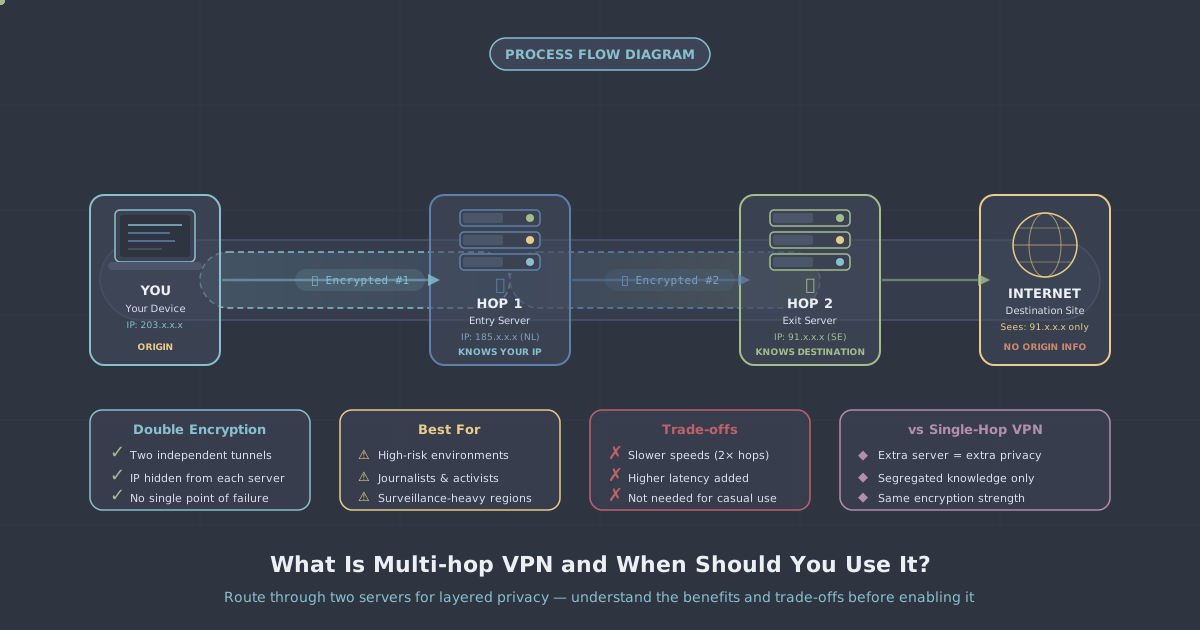
In a multi-hop configuration, your traffic is encrypted and sent to a first VPN server (the entry node), which then forwards it—still encrypted—through a second VPN server (the exit node), and only then out to the internet.
The layering works like this:
- Your device encrypts traffic and connects to Server A (the entry node).
- Server A knows your real IP address, but cannot see your destination—the traffic is still encrypted for Server B.
- Server B decrypts the traffic and forwards it to the destination. Server B knows where the traffic is going, but sees only Server A's IP, not yours.
- The destination website sees Server B's IP address.
No single server holds the complete picture. Server A knows who you are but not where you are going. Server B knows where you are going but not who you are. For this separation to have real value, the two servers should ideally be in different jurisdictions—or at minimum operated in a way that prevents correlation between them.
What Multi-hop Does Not Protect Against
It is worth being precise here, because multi-hop is sometimes oversold.
- It does not eliminate metadata leaks on your device. If your browser is leaking WebRTC, or you are logged into an account that identifies you, two hops will not help. Run an IP and DNS leak test to confirm your configuration is clean.
- It does not defeat a global passive adversary. A sufficiently resourced adversary capable of monitoring both the traffic entering Server A and the traffic leaving Server B simultaneously could, in theory, perform traffic correlation to link your connection. Multi-hop raises the bar significantly, but it does not make this theoretically impossible.
- It does not compensate for a poor no-logs policy. If the VPN provider logs connection metadata on both servers, chaining them together provides less benefit. The value of multi-hop is tied directly to how little data each node retains.
- It does not help with application-layer tracking. Cookies, browser fingerprinting, and logged-in accounts track you regardless of how many VPN hops you use.
The Real Trade-offs
Multi-hop is not free. There are genuine costs to consider before enabling it.
Latency
Adding a second server adds a second network hop. Depending on the geographic distance between the two servers, you might add anywhere from 20 to 150 milliseconds of additional round-trip time. For browsing and file transfers, this is barely noticeable. For real-time applications—voice calls, video conferencing, or latency-sensitive gaming—it can be a meaningful degradation.
Throughput
Your traffic has to be processed by two servers instead of one. In practice, on a well-provisioned network with modern protocols like WireGuard, the throughput penalty is modest. With older protocols and congested servers, it can be more pronounced.
Complexity
Multi-hop configurations require more setup and, if something goes wrong, more troubleshooting. A connection that drops mid-session may take longer to diagnose.
When Multi-hop Is Worth It
Given those trade-offs, there are specific scenarios where multi-hop provides meaningful, practical benefit.
Journalists, activists, and high-risk users
If you are a journalist communicating with a sensitive source, a human rights worker in an authoritarian country, or anyone who faces serious real-world consequences if their identity is linked to their online activity, the extra layer of separation is worth the latency cost. The adversaries in these situations may have access to ISP-level data in one jurisdiction. Multi-hop across jurisdictions limits what any single party can determine about your traffic.
Protecting against a compromised exit node
On a standard single-hop connection, if the exit node were somehow compromised or subpoenaed, an adversary could potentially obtain your real IP address from connection logs. With multi-hop, the exit node only ever sees the entry node's IP. Your real IP is one step further removed from the traffic destination.
Untrusted network environments
If you are operating from a network you have strong reason to distrust—a state-controlled network, a heavily monitored corporate environment, or a country with aggressive traffic interception—multi-hop raises the cost of traffic analysis. An observer on your local network can see you connecting to the entry node, but the chain of forwarding from there is hidden.
Separating identity from activity at the network level
For users with a specific operational security requirement—keeping their physical location entirely separate from the services they access—multi-hop with servers in different countries adds a meaningful structural barrier. It does not guarantee anonymity, but it does make correlation attacks considerably harder.
Multi-hop vs. Tor: Knowing the Difference
Tor also routes traffic through multiple nodes—typically three—and is specifically designed to defeat traffic correlation through its onion routing model. The comparison is worth making because users often ask which to choose.
| Feature | Multi-hop VPN | Tor |
|---|---|---|
| Number of hops | Typically 2 | Typically 3 |
| Speed | Moderate reduction | Significant reduction |
| Trust model | VPN provider operates both nodes | Decentralised, volunteer-run nodes |
| Suitable for streaming/large transfers | Yes, with caveats | Generally not practical |
| Resists global passive adversary | Partially | Better, but not absolute |
For a broader comparison of these technologies, see our guide on VPN vs proxy vs Tor. In short: multi-hop VPN is faster and more practical for day-to-day use; Tor is better suited to anonymous browsing where speed is secondary.
Who Should Not Bother With Multi-hop
If your primary goals are accessing geo-restricted streaming content, protecting your data on public Wi-Fi, or keeping your ISP from seeing your browsing habits, a standard single-hop connection handles all of those well. The added latency of multi-hop would be a noticeable downgrade with no practical privacy benefit for those use cases.
Multi-hop is not a setting to enable out of habit or because more sounds better. It is a deliberate choice for specific threat models.
Practical Recommendations
Before enabling multi-hop on any configuration, it is worth thinking clearly about what you are protecting against. Ask yourself:
- Is there a realistic scenario where a single VPN server being compromised would expose me?
- Am I operating in a jurisdiction—or connecting through one—where ISP-level surveillance is a concern?
- Can I accept slower speeds and slightly less reliable connections in exchange for the added separation?
If the answers are yes, multi-hop is a sensible step up. If you are uncertain about your current setup's baseline security, start by running an IP leak test to confirm your single-hop connection is clean before adding complexity on top of it.
For users in heavily restricted environments—where even the fact of VPN use may draw scrutiny—it is also worth looking at protocol-level obfuscation. Our VLESS+REALITY protocol guide covers how traffic obfuscation works and where it fits alongside privacy-focused configurations.
Multi-hop VPN is a useful tool. Like most security measures, it works best when applied deliberately to a specific problem rather than used as a general-purpose upgrade. If your threat model calls for it, the trade-off is worth making. If it does not, a clean single-hop connection with a no-logs provider handles most real-world privacy needs.