8 min read
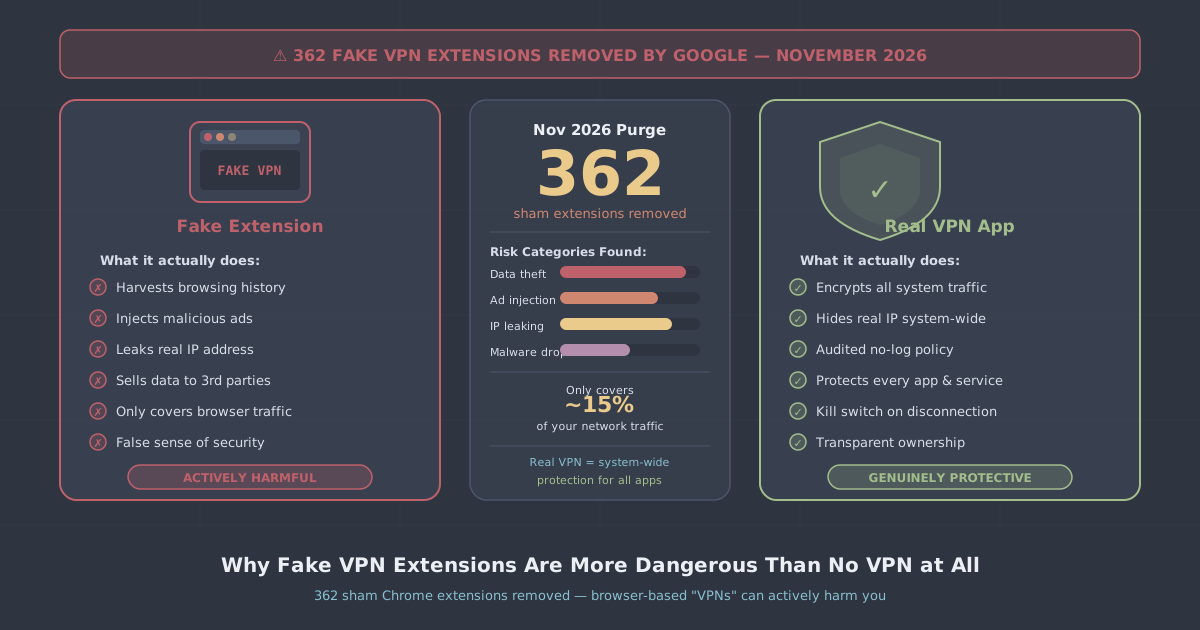
On 16 November 2026, Google quietly removed 362 out of 369 suspicious VPN extensions it had flagged in the Chrome Web Store. According to TechRadar's reporting, those extensions had collectively accumulated more than 218,000 users before being pulled. Seven remained live at the time of writing, and security researchers warned that new copycat extensions bearing the same hallmarks were continuing to appear.
That figure—218,000 people who installed something marketed as a VPN but was anything but—deserves a moment's thought. These weren't obscure curiosities. They were the top result for some users searching for privacy tools. And according to AmneziaVPN, extensions carrying malicious code, including tools specifically designed to steal VPN credentials, are released every day.
This article explains what made those extensions dangerous, why the browser extension model is structurally unsuitable for real VPN functionality, and what a legitimate system-level VPN actually does that a browser extension simply cannot.
What Google Actually Found
The flagged extensions shared a cluster of tell-tale characteristics. Investigators noted that they were published under disposable personal developer email addresses, hosted their privacy policies on anonymous or throwaway domains, and in several cases deliberately imitated the names of established VPN brands—presumably to harvest trust that belonged to someone else.
The targeting was deliberate. The batch was specifically aimed at Russian users, a demographic that has strong practical reasons to seek circumvention tools given the state of internet censorship there. That's not a coincidence—people in high-censorship environments are often the most motivated to install a VPN quickly, and that urgency makes them valuable targets.
What the extensions actually did with the access they were granted varied, but credential theft was among the documented capabilities. When you grant a browser extension broad permissions, you are giving a piece of software—written by someone you know nothing about—a privileged position inside the application you use for banking, email, and anything else that runs in a browser tab.
Why Browser Extensions Cannot Be Real VPNs
This is worth stating plainly, because the Chrome Web Store category label encourages a lot of confusion: a browser extension is structurally incapable of behaving like a full VPN. The reasons are technical, not cosmetic.
They only cover the browser
A VPN works at the network layer of your operating system. When you connect to a VPN server, every application on your device—your email client, your messaging apps, your OS update service, background telemetry, everything—routes its traffic through the encrypted tunnel. A browser extension has no access to that layer. It can only intercept what moves through the browser itself. Everything else on your device continues to communicate in the clear, through your real IP address, with no encryption.
If you're using a browser extension because you want to protect your activity from your ISP, or because you're on an untrusted public network, the extension won't do it. Your ISP can still see every non-browser connection. Any attacker on the same Wi-Fi network can still observe traffic from every other app you have running.
They cannot implement serious protocols
Security experts quoted in the TechRadar report were direct: browser extensions are structurally incapable of implementing reliable anti-censorship or encryption protocols. WireGuard and OpenVPN—the protocols that underpin genuine VPN protection—operate at a system level. They require kernel drivers or at minimum tightly integrated OS APIs. A Chrome extension runs inside a sandboxed JavaScript environment. It has neither the access nor the cryptographic tooling to implement these protocols properly.
What browser extensions typically do instead is act as a proxy—routing your browser traffic through a third-party server without meaningful encryption. That means the operator of that proxy server can see everything you're doing in the clear. For a malicious extension, that's the entire business model.
They ask for permissions that have nothing to do with VPNs
Legitimate VPN functionality doesn't require read access to your browsing history, the ability to modify web request headers, or permission to read and alter content on every website you visit. Yet these are exactly the permissions that many fake VPN extensions request during installation—and that many users click through without reading.
Those permissions are what enables credential harvesting. An extension with webRequest and tabs permissions can intercept form submissions, read session cookies, and log every URL you visit. The VPN branding is just the reason someone agreed to install it.
The Trust Problem With the Chrome Web Store
Google's removal of 362 extensions is welcome, but the episode also illustrates a structural limitation of app store moderation. The extensions that were removed had already been installed 218,000 times. The seven that remained live at the time of publication were still accessible. And the researchers' warning that new copycat extensions appear daily suggests that takedowns are, at best, playing catch-up.
The developer email and privacy policy patterns that flagged these extensions are relatively easy to identify in bulk—but they're also easy to rotate. A bad actor who reads the same TechRadar report will simply use slightly different infrastructure next time. The underlying incentive structure doesn't change.
This isn't a reason to distrust every extension in every category. It is a reason to treat VPN-branded extensions with particular scepticism, because the combination of broad permissions, a trusting user base with privacy concerns, and a very low barrier to publishing creates an unusually attractive target.
What a System-Level VPN Actually Does
A genuine VPN application installs a network tunnel driver and routes all device traffic through an encrypted connection to a VPN server. The practical differences from a browser extension are substantial:
- All traffic is covered—not just what happens in one browser, but every app, every background process, every connection your device makes.
- Encryption is real—WireGuard and OpenVPN implement cryptographic protocols at the system level that cannot be replicated in a browser sandbox.
- Your IP is masked system-wide—websites and services see the VPN server's IP address regardless of which app or browser you're using.
- DNS requests are protected—a VPN app routes DNS queries through the tunnel, so your ISP cannot see which domains you're resolving. A browser extension typically cannot guarantee this.
- A kill switch is possible—a system-level VPN can block all traffic if the tunnel drops, preventing accidental exposure. This is not achievable from inside a browser extension.
If you want to understand the technical foundation in more detail, our explainer on how VPNs work covers the basics without assuming prior knowledge.
How to Check Whether What You Have Is Legitimate
If you currently have a VPN extension installed, it's worth asking a few questions before continuing to use it:
- Who publishes it? Is there a named company with a verifiable website, a support address, and an auditable privacy policy hosted on a domain they clearly own?
- What permissions does it request? Open Chrome's extension manager, find the extension, and review its permissions. If it has access to your browsing history or can modify content on all sites, that's a significant red flag for something claiming to be a VPN.
- Is there a corresponding native app? Any legitimate VPN provider should offer a full application for your operating system—not just a browser extension. If the only product is the extension, treat that as a warning sign.
- Does the privacy policy actually explain what happens to your traffic? Vague language about "we may share data with partners" is not a no-logs policy.
You can also test whether your current setup is actually protecting your IP address and DNS with our IP leak test—a browser extension that is functioning as a proxy rather than a VPN will often fail this in revealing ways.
A Note on Browser Extensions From Legitimate VPN Providers
It's worth drawing a distinction here. PremierVPN publishes a free browser extension called PremierVPN Protect, available now for Firefox with a Chrome version in review. This is not marketed as a standalone VPN—it's a companion tool that adds features like tracker blocking and DNS protection for use alongside the full app. Transparency about what an extension can and cannot do matters.
The problem is not browser extensions as a category. The problem is extensions that claim to be full VPNs, request sweeping permissions on the strength of that claim, and either do nothing useful or actively harvest the data they've been granted access to.
The Practical Recommendation
If you need VPN protection—whether for privacy on public networks, bypassing geographic restrictions, or securing your traffic in a censorship-heavy environment—you need a native application, not a browser extension. The app needs to run at the system level, support established protocols, and come from a provider with a clear no-logs policy and verifiable contact details.
PremierVPN's native apps for Windows, macOS, iOS, and Android use WireGuard by default, with WireGuard Stealth, OpenVPN, and VLESS+REALITY available for restrictive networks. Our no-logs policy explains precisely what we do and don't retain.
The 218,000 people who installed one of those 362 removed extensions were looking for the same thing any VPN user wants: privacy and security. What they got was the opposite. The most useful thing to take from Google's sweep is not reassurance that the store is now clean—it isn't—but a clearer understanding of why a browser extension was never the right tool for the job in the first place.